When our team decided to move our Playwright tests from C# to TypeScript, I thought the job was clear. We would rewrite the tests in a new language, check that they still pass, and move on.
It didn’t work out that way. Almost every test I opened had something behind it that didn’t survive the move: data that only existed on one environment, a login at the start of every test, a setup step somebody used to do by hand before a run. If we had translated those tests line by line, we would have ended up with the same problems, just in TypeScript.
So we treated the migration as a chance to rebuild how the framework works.
In this post I want to share what we changed and what I would do the same way again. Some of it is specific to Playwright, but most of it applies to any test framework migration.
A bit of context first: the product is an enterprise web application with several user roles, and we had around 200 Playwright UI and API tests in C#, running in Azure Pipelines.
Why TypeScript
Playwright written with .NET does its job, but TypeScript is Playwright’s home language. The test runner, fixtures and tracing are designed for it first, new features usually arrive there before other languages, and there’s far more community material when you get stuck. We also expected to write less framework code of our own. And AI coding assistants handle Playwright in TypeScript much better than in C#, which mattered for how we planned to do the migration (more on that later).
Deciding which tests to migrate
We didn’t move every test across as it was. Going through the old suite one test at a time, we kept asking whether each check really needed a browser. Quite often it didn’t. Many checks, like whether a role is allowed to do something, can be tested faster and more reliably through the API, and some logic is better covered by unit tests closer to the code.
We rebalanced coverage across unit, API and UI levels. In the end we cut the number of end-to-end tests by 40%, while keeping every critical user path covered in the UI.
The framework underneath changed even more than the tests: how tests get their data, how they log in, where setup lives and how the project is organised. That’s where most of our old problems were, and the rest of this post is about those changes.
Test data the tests can rely on
The first thing that broke during the migration was test data.
Our old tests used whatever happened to be on the environment. IDs and user names were hardcoded in the test code, so a suite that passed on one environment could fail on another simply because the records it expected weren’t there.
We fixed this by giving every test suite its own precondition data. It describes everything the suite needs before the first test runs: the initial user data, folder structure and the test files themselves. On top of that, every environment has its own JSON with the data that already exists there, such as IDs and names, so the nightly run can use it straight away. Our rule was to create only what a suite needs, and only when it needs it.
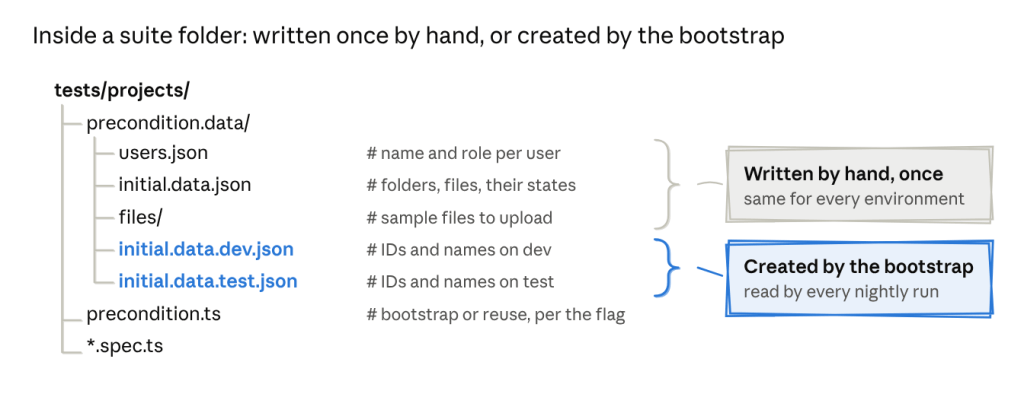
Now, if I want to know what a suite depends on, I open its folder. Nothing is hidden in a shared environment or in someone’s head.
We also separated two kinds of data.
Values that never change, like roles, statuses and permission levels, live in enums and constants. Everything a test creates, such as project names and descriptions, is generated with Faker, so each run works with fresh records.
export enum Role { Admin = 'admin', Manager = 'manager', Contributor = 'contributor',}
import { faker } from '@faker-js/faker';export interface Project { name: string; description: string;}export const newProject = (): Project => ({ name: `Project ${faker.string.alphanumeric(8)}`, description: faker.lorem.sentence(),});
I didn’t expect this part to matter for speed, but it did. Once tests stopped sharing records, we could run them in parallel without them getting in each other’s way.
Generating data or reusing it
The precondition files describe what a suite needs, but someone still has to put that data on the environment. Before the migration, that someone was usually a person. We prepared data by hand on new environments, tests passed only where the data had been set up, and when a test failed it was hard to tell what state it had run against.
We looked at two obvious options.
- Generating everything before each run keeps tests clean and isolated, but it’s slow and puts a lot of load on the database.
- Reusing existing data, which is what the old suite did, is fast, but over time the data drifts and tests quietly start depending on each other.
We ended up with something in between. It took more work to build, but it gave us the speed of reusing data with most of the reliability of generating it.
One environment variable, DATA_GENERATION, decides which path a suite takes:
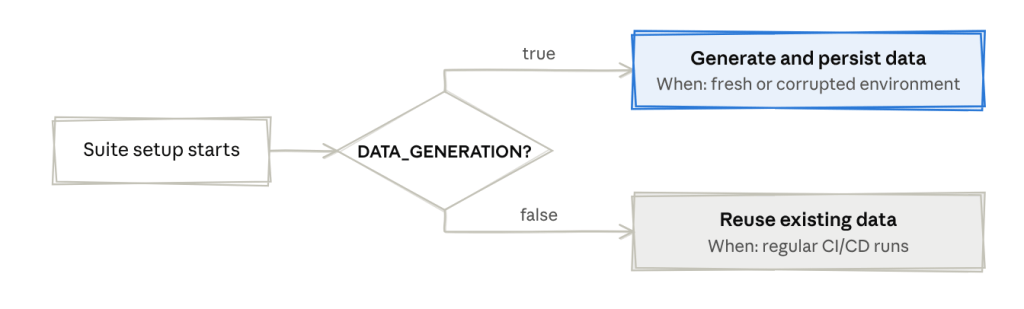
When it’s true, the setup creates everything from the precondition files and saves what it created. We use this on a new environment, or when the data has got into a bad state. When it’s false, which is the default for CI runs, the setup skips all of that and loads the data from the last bootstrap.
// tests/precondition.tsexport async function prepareSuiteData(): Promise<SuiteData> { const shouldGenerateData = process.env.DATA_GENERATION === 'true'; if (!shouldGenerateData) { return loadSuiteData(); } const suiteData = await createFromPreconditions(precondition); await saveSuiteData(suiteData); return suiteData;}
Nobody prepares data by hand anymore, and setting up a new environment is one pipeline run with the flag switched on.
Logging in once per role
In the old suite, almost every test started with a login through the UI. That made runs slow, and because login involves redirects and timeouts, it was also one of our most common sources of flaky failures. A test about permissions could fail because the login page was slow that morning. Environments with two-factor authentication couldn’t be tested at all.
Now authentication happens once per role, in a setup step that runs before the tests.
For each role, the setup reads the password and 2FA secret from our secret vault, logs in, and saves the browser storage state to a file in an .auth folder: admin.json, manager.json and contributor.json. It also stores the role’s API token, so tests that call the API directly can reuse it.
// auth.setup.tsimport { test as setup } from '@playwright/test';import { roles } from './config/roles';import { getSecrets } from './helpers/secrets';import { login, getApiToken, saveApiToken } from './helpers/auth';for (const role of roles) { setup(`authenticate as ${role}`, async ({ page, request }) => { const credentials = await getSecrets(role); // password and 2FA secret from the vault await login(page, credentials); // UI login, including the 2FA step await page.context().storageState({ path: `.auth/${role}.json` }); await saveApiToken(role, await getApiToken(request, credentials)); });}
In a test, choosing a role is one line at the top of the describe block:
test.describe('Manager permissions', () => { test.use({ storageState: '.auth/manager.json' }); test('UI80105: Manager adds a project shared with all users - should be visible to everyone', async ({ page }) => { // the test starts already logged in as a manager });});
Saved sessions come with their own risks. They expire, and a test can end up depending on something the login step left behind without anyone noticing. We handle expiry with a session refresh, so an old session gets renewed instead of failing the run.
One thing we got almost for free: because the setup generates the 2FA code from the secret, we can finally run the suite against environments with MFA enabled.
Running in CI from the start
We put migrated tests into the pipeline from the first days of the migration instead of waiting until everything was moved.
Looking back, this was one of our better decisions. Problems with data, sessions and parallel runs showed up while the design was still easy to change, not after we had built 200 tests on top of it.
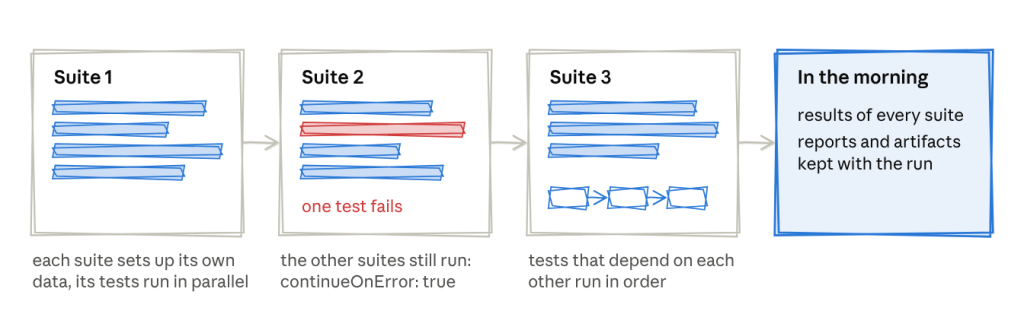
The pipeline runs every weekday night on a fresh Ubuntu agent. Suites run one after another, because each suite sets up its own data, while the tests inside a suite run in parallel. The few tests in a file that really depend on each other run in order. We also set continueOnError: true in Azure Pipelines, so when one suite fails, the others still run and we see the full picture in the morning. Reports and artifacts are kept with each run, so most failures can be investigated without running anything locally.
Where AI helped, and where it didn’t
Converting around 200 tests is a lot of repetitive work, so we used GitHub Copilot for much of it.
What I learned is that AI is good at following a structure, but it can’t decide what that structure should be. It only produced consistent tests after we had agreed on what a good test looks like.
So before migrating anything with Copilot, we wrote an instructions file for the repository, which we called our constitution. It has rules split into MUST, SHOULD and WON’T, plus our file naming conventions, where things live, how tests are named and tagged, how the API services and clients are built, and how secrets and environments are configured in the pipeline.
I can’t share our internal file, but I later wrote one in the same style for a workshop, and it’s public: AGENTS.md in my ai-assisted-testing-demo repo. It’s written for a small todo app rather than an enterprise product, but the structure is the same. A few lines from it:
MUST Locator priority. getByRole() → getByLabel() → getByPlaceholder() → getByText(). Web-first assertions only. Never page.waitForTimeout(). Seed data through the API, not the UI. WON'T No getByTestId, no XPath, no CSS selectors. No new tooling without being asked.
The most useful rules turned out to be the ones that say what not to do. Without them, the assistant happily adds a hard wait or a new dependency to make a test pass.
Then we wrote one migration prompt that walks through a C# test step by step and says where each old pattern should go:
| Step | C# (before) | TypeScript (after) |
|---|---|---|
| 1. Test data | Hardcoded GUIDs | Data loaded from the environment: JSON.parse(process.env.PROJECT_DATA) |
| 2. Authentication | await Login(AdminUser) inside each test | test.use({ storageState }) at describe level |
| 3. Test methods | [Test] async Task ... | test('TC{ID}: description', async ({ pages, adminAPIService }) => { ... }) |
| 4. Setup | Data fetched or created inside the test | test.beforeEach() with module-level variables |
| 5. Teardown | AddTearDownActions(...) | test.afterEach() |
| 6. Real-time events | RunAndWaitForResponseAsync | a runAndWaitForSignalR(ws, callback, event) helper |
With both in place, the tests Copilot produced looked like the ones we wrote by hand, and code reviews could focus on whether the logic was right rather than on style. When the output was messy, it usually meant our own rules were unclear in that area, which was useful to find out.
What the framework looks like now
config/ environment and app configurationhelpers/ apifactory/ API service and client layer datafactory/ test data management fixtures/ Playwright fixture definitionspages/ Page Object Modelstests/ {suite_name}/ one folder per test suite *.spec.ts test specs precondition.data.ts the suite's initial data definition precondition.ts suite setup: auth and seed data, adjusted per suiteplaywright.config.ts
Test names follow one pattern, so a failure in the report already tells you what broke:
{UI|API}{TestID}: Specific scenario - expected outcomeUI80105: Manager adds a project shared with all users - should be visible to everyoneAPI80201: Contributor adds a project via API - should be forbidden
Tags let us choose what to run: @ui for end-to-end UI scenarios, @api for API scenarios and @smoke for the smoke set.
So far we’ve migrated around 200 tests. The suite runs about 30% faster than before, and we see around 40% fewer flaky failures.
The tests themselves are also shorter and easier to read, they depend much less on existing data, and more checks now run at the API level instead of through the UI. Along the way we switched to accessibility-first locators like getByRole and getByLabel, and we ended up with a written guide that other teams can use for their own migrations.
Takeaways for your own migration
- Don’t just translate, decide the target architecture first. The language change is the easy part.
- Question every test, not only the framework. Ask whether each check really needs a browser. Moving checks down to the API and unit level makes the suite faster and less flaky.
- Fix test data before anything else. Documented preconditions and isolated data make everything else possible, including parallel runs.
- Choose your data strategy deliberately. Always generating and always reusing both have costs. A flag that switches between them gives you speed and reliability.
- Log in once per role. Saved sessions make tests faster and more stable, and they can make MFA environments testable.
- Put CI in place on day one. Let the pipeline tell you what’s broken while the design is still easy to change.
- Give AI rules before you give it work. A clear constitution and an explicit migration prompt turn an assistant into a consistent pair of hands.
What’s next
We’re finishing the remaining suites, automating the creation of organisations, projects and users, expanding coverage, and tagging a proper smoke checklist.
If you’ve been through a migration like this, I’d be curious to hear what surprised you. You can find me on LinkedIn.