Tag: contract testing

  • Automating Contract Testing in a CI/CD Pipeline with GitHub Actions

    Automating Contract Testing in a CI/CD Pipeline with GitHub Actions

    Using a Pact Broker to Manage Contracts Across Microservices

    In the previous article, I raised an important question: What if the provider and consumer microservices do not share the same repository but still need access to the contract from a third-party source? The solution to this challenge is the Pact Broker.

    In this article, we will explore how the Pact Broker works and how to implement pipeline using GitHub Actions.

    When Do You Need a Pact Broker?

    A Pact Broker is essential in scenarios where:

    • The provider and consumer microservices are in separate repositories but must share the same contract.
    • You need to manage contracts across different branches and environments.
    • Coordinating releases between multiple teams is required.

    Options for Setting Up a Pact Broker

    There are multiple ways to set up a Pact Broker:

    1. Own Contract Storage Solution – Implement your own contract-sharing mechanism.
    2. Hosted Pact Broker (PactFlow) – A cloud-based solution provided by SmartBear.
    3. Self-Hosted Open-Source Pact Broker – Deploy and manage the Pact Broker on your infrastructure.

    As a starting point, PactFlow is a great solution due to its ease of use.

    Publishing Contracts to the Pact Broker

    For demonstration purposes, we will use the free version of PactFlow. Follow these steps to publish contracts:

    1. Sign Up for PactFlow

    Visit PactFlow and create a free account.

    2. Retrieve Required Credentials

    • Broker URL: Copy the URL from the address bar (e.g., https://custom.pactflow.io/).
    • Broker API Token: Navigate to Settings → API Tokens and copy the read/write token for CI/CD pipeline authentication.

    3. Setting Up a CI/CD Pipeline with GitHub Actions

    Setting up CI/CD pipeline using GitHub Actions.

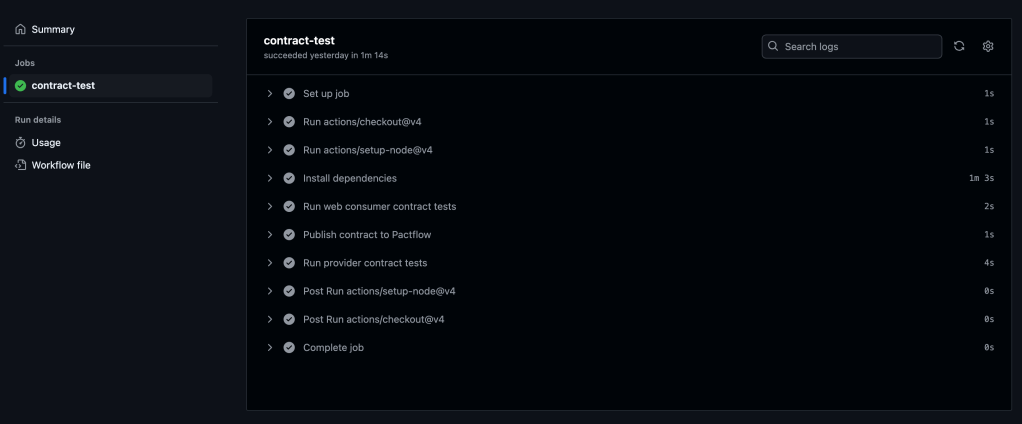
    We will configure GitHub Actions to trigger on a push or merge to the main branch. The workflow consists of the steps displayed on the diagram.

    To set up GitHub Actions, create a .yml file in the .github/workflows directory. In this example, we’ll use contract-test-sample.yml:

    name: Run contract tests
    
    on: push
    
    env:
      PACT_BROKER_BASE_URL: ${{ secrets.PACT_BROKER_BASE_URL }}
      PACT_BROKER_TOKEN: ${{ secrets.PACT_BROKER_TOKEN }}
    
    jobs:
      contract-test:
        runs-on: ubuntu-latest
        steps:
          - uses: actions/checkout@v4
          - uses: actions/setup-node@v4
            with:
              node-version: 18
          - name: Install dependencies
            run: npm install
          - name: Run web consumer contract tests
            run: npm run test:consumer
          - name: Publish contract to PactFlow
            run: npm run publish:pact
          - name: Run provider contract tests
            run: npm run test:provider

    Before running the workflow, store the required secrets in your GitHub repository:

    1. Navigate to Repository → Settings → Secrets and Variables.
    2. Create two secrets:
      • PACT_BROKER_BASE_URL
      • PACT_BROKER_TOKEN

    Save, commit, and push your changes to the remote repository.

    Navigate to the Actions tab in GitHub to verify if the pipeline runs successfully.

    You should see all the steps running successfully like on the screenshot below:
    7. Verifying the Contract in PactFlow

    Once the pipeline runs successfully:

    • Navigate to PactFlow.
    • Verify if the contract has been published.
    • You should see two microservices and the contract established between them.

    Two microservices – Library Consumer and Library Provider
    Pact between two microservices, which is published and stored in PactFlow

    Configuring Contract Versioning

    If there are changes in the contract (e.g., if a new version of a consumer or provider is released), versioning should evolve too. Automating this process is crucial.

    A recommended approach is using GitHub Commit ID (SHA), ensuring that contract versions are traceable to relevant code changes.

    1. Define the Versioning Variable

    In the contract-test-sample.yml file, introduce a new environment variable GITHUB_SHA:

    GITHUB_SHA: ${{ github.sha }}

    2. Update the Pact Publish Script

    Modify the pact:publish script to use the automatically generated version:

    "publish:pact": "pact-broker publish ./pacts --consumer-app-version=$GITHUB_SHA --tag=main --broker-base-url=$PACT_BROKER_BASE_URL --broker-token=$PACT_BROKER_TOKEN"

    3. Update provider options with providerVersion value:

    const opts = {
                provider: "LibraryProvider",
                providerBaseUrl: "http://localhost:3000",
                pactBrokerToken: process.env.PACT_BROKER_TOKEN,
                providerVersion: process.env.GITHUB_SHA,
                publishVerificationResult: true,
                stateHandlers: {
                    "A book with ID 1 exists": () => {
                        return Promise.resolve("Book with ID 1 exists")
                    },
                },
            }

    Configuring Branches for Contract Management

    If multiple people are working on the product in different branches, it is crucial to assign contracts to specific branches to ensure accurate verification.

    1. Define the Branching Variable

    Add GITHUB_BRANCH to the .yml file:

    GITHUB_BRANCH: ${{ github.ref_name }}

    2. Update the Pact Publish Script for Branching

    Modify pact:publish to associate contracts with specific branches:

    "publish:pact": "pact-broker publish ./pacts --consumer-app-version=$GITHUB_SHA --branch=$GITHUB_BRANCH --broker-base-url=$PACT_BROKER_BASE_URL --broker-token=$PACT_BROKER_TOKEN"

    3. Update provider options with providerVersionBranch value:

    const opts = {
                provider: "LibraryProvider",
                providerBaseUrl: "http://localhost:3000",
                pactBrokerToken: process.env.PACT_BROKER_TOKEN,
                providerVersion: process.env.GITHUB_SHA,
                providerVersionBranch: process.env.GITHUB_BRANCH,
                publishVerificationResult: true,
                stateHandlers: {
                    "A book with ID 1 exists": () => {
                        return Promise.resolve("Book with ID 1 exists")
                    },
                },
            }

    Using the can-i-deploy tool

    The can-i-deploy tool is a Pact feature that queries the matrix table to verify if a contract version is safe to deploy. This ensures that new changes are successfully verified against the currently deployed versions in the environment.

    Running can-i-deploy for consumer:

    pact-broker can-i-deploy --pacticipant LibraryConsumer --version=$GITHUB_SHA

    Running can-i-deploy for provider:

    pact-broker can-i-deploy --pacticipant LibraryProvider --version=$GITHUB_SHA

    If successful, it confirms that the contract is verified and ready for deployment.

    To reuse these commands, we will create scripts for verification in package.json file:

    "can:i:deploy:consumer": "pact-broker can-i-deploy --pacticipant LibraryConsumer --version=$GITHUB_SHA"
    
    "can:i:deploy:provider": "pact-broker can-i-deploy --pacticipant LibraryProvider --version=$GITHUB_SHA"

    And then update GitHub Actions pipeline:

    name: Run contract tests
    
    on: push
    
    env:
      PACT_BROKER_BASE_URL: ${{ secrets.PACT_BROKER_BASE_URL }}
      PACT_BROKER_TOKEN: ${{ secrets.PACT_BROKER_TOKEN }}
      GITHUB_SHA: ${{ github.sha }}
      GITHUB_BRANCH: ${{ github.ref_name }}
    
    jobs:
      contract-test:
        runs-on: ubuntu-latest
        steps:
          - uses: actions/checkout@v4
          - uses: actions/setup-node@v4
            with:
              node-version: 18
          - name: Install dependencies
            run: npm i
          - name: Run web consumer contract tests
            run: npm run test:consumer
          - name: Publish contract to Pactflow
            run: npm run publish:pact
          - name: Run provider contract tests
            run: npm run test:provider
          - name: Can I deploy consumer?
            run: npm run can:i:deploy:consumer
          - name: Can I deploy provider?
            run: npm run can:i:deploy:provider

    Add changes, commit and push. Navigate to the Actions tab in GitHub to verify if the pipeline runs successfully.

    You should see all the steps running successfully like on the screenshot below:
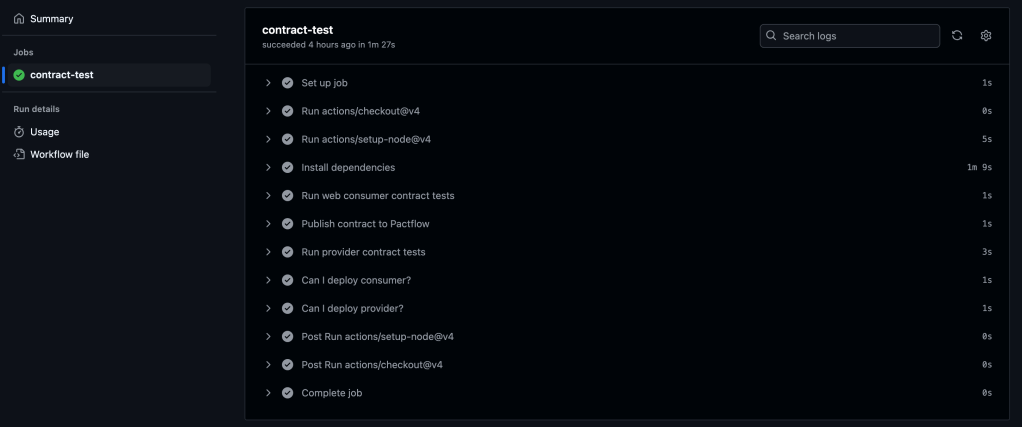
    GitHub Actions pipeline contains extra steps, which verify if a contract version is safe to deploy

    Conclusion

    The Pact Broker is important for managing contracts across microservices, ensuring smooth collaboration between independent services. By automating contract versioning, branch-based contract management, and deployment workflows using GitHub Actions, teams can can reduce deployment risks, improve service reliability, and speed-up release cycles.

    For a complete implementation, refer to the final version of the code in the repository.

  • Consumer-Driven Contract Testing in Practice

    Consumer-Driven Contract Testing in Practice

    Introduction

    In the previous article consumer-driven contract testing has been introduced. And at this point, I am sure you can’t wait to start actual implementation. So let’s not delay any further!

    Let’s start with the implementation using Pact. 

    Based on official documentation, Pact is a code-first tool for testing HTTP and message integrations using contract tests.

    As a system under test we are going to use consumer-provider applications written in JavaScript. You can find the source code in the GitHub Repository.

    Consumer Tests

    The focus of the consumer test is the way to check if the consumer’s expectations match what the provider does. These tests are not supposed to verify any functionality of the provider, instead focus solely on what the consumer requires and validate whether those expectations are met.

    Loose Matchers

    To avoid brittle and flaky tests, it is important to use loose matchers as a best practice. This makes contract tests more resilient to minor changes in the provider’s response. Generally, the exact value returned by the provider during verification is not critical, as long as the data types match (Pact documentation). However, an exception can be made when verifying a specific value in the response.

    Pact provides several matchers that allow flexible contract testing by validating data types and structures instead of exact values. Key loose matchers can be found in the Pact documentation.

    Example without loose matchers (strict matching):

    describe("getBook", () => {
        test("returns a book when a valid book id is provided", async () => {
    
            await provider.addInteraction({
                states: [{ description: "A book with ID 1 exists" }],
                uponReceiving: "a request for book 1",
                withRequest: {
                    method: "GET",
                    path: "/books/1",
                },
                willRespondWith: {
                    status: 200,
                    headers: { "Content-Type": "application/json" },
                    body: {
                        id: 1,
                        title: "To Kill a Mockingbird",
                        author: "Harper Lee",
                        isbn: "9780446310789"
                    },
                },
            })
    
            await provider.executeTest(async (mockService) => {
                const client = new LibraryClient(mockService.url)
                const book = await client.getBook(1)
                expect(book).toEqual(expectedBook)
            })
        })
    })

    Problem: This test will fail if id, title, or author, isbn  changes even slightly.

    Example with loose matchers (flexible and maintainable):

    Using Pact matchers, we allow the provider to return any valid values of the expected types:

    describe("getBook", () => {
        test("returns a book when a valid book id is provided", async () => {
          const expectedBook = { id: 1, title: "To Kill a Mockingbird", author: "Harper Lee", isbn: "9780446310789" }
    
          await provider.addInteraction({
            states: [{ description: "A book with ID 1 exists" }],
            uponReceiving: "a request for book 1",
            withRequest: {
              method: "GET",
              path: "/books/1",
            },
            willRespondWith: {
              status: 200,
              headers: { "Content-Type": "application/json" },
              body: like(expectedBook),
            },
          })
    
          await provider.executeTest(async (mockService) => {
            const client = new LibraryClient(mockService.url)
            const book = await client.getBook(1)
            expect(book).toEqual(expectedBook)
          })
        })
      })
    

    In this case the contract remains valid even if actual values change, validation focused only on ensuring that data types and formats are correct.

    Steps to write consumer contract tests

    Scenarios:

    1. Validate that LibraryClient.getAllBooks() retrieves a list of books.
    2. Validate that LibraryClient.getBook(id) correctly fetches a single book when given a valid ID.

    To start with hands-on, you have to clone the repository with the consumer and provider.

    To start with consumer, open consumer.js file. Inside you can find the LibraryClient class represents the consumer in a consumer-driven contract testing setup. It acts as a client that interacts with an external Library API (provider) to fetch and manage book data.

    There are a few functions present:

    1. getBook(id) – Fetches a single book by its id. Returns the data in JSON format.
    2. getAllBooks() – Fetches all books from the API. Returns a list of books in JSON format.
    3. addBook(title, author, isbn) – Sends a POST request to add a new book. Returns the newly created book’s details.

    Writing the first consumer contract test:

    1. Importing the required dependencies and Consumer Class.
    const path = require('path');
    const { PactV3, MatchersV3 } = require('@pact-foundation/pact');
    const LibraryClient = require('../src/client');
    1. Setting up the mock provider
    const provider = new PactV3({
        dir: path.resolve(process.cwd(), 'pacts'),
        consumer: "LibraryConsumer",
        provider: "LibraryProvider"
    })

    The code above creates a Pact mock provider (provider) using PactV3 library where specifies:

    • LibraryConsumer as the name of the consumer (the client making requests).
    • LibraryProvider as the name of the provider (the API responding to requests).
    • Passing parameter dir to define directory for the contract to be stored. 
    1. Setting up the interaction of the consumer and mock provider and register consumer expectations.
    const EXPECTED_BOOK = { id: 1, title: "To Kill a Mockingbird", author: "Harper Lee", isbn: "9780446310789" }
    
    describe("getAllBooks", () => {
        test("returns all books", async () => {
    
            provider
                .uponReceiving("a request for all books")
                .withRequest({
                    method: "GET",
                    path: "/books",
                })
                .willRespondWith({
                    status: 200,
                    body: MatchersV3.eachLike(EXPECTED_BOOK),
                })
    
            await provider.executeTest(async (mockService) => {
                const client = new LibraryClient(mockService.url)
                const books = await client.getAllBooks()
                expect(books[0]).toEqual(EXPECTED_BOOK)
            })
        })
    })
    
    describe("getBook", () => {
        test("returns a book when a valid book id is provided", async () => {
    
            provider
                .given('A book with ID 1 exists')
                .uponReceiving("a request for book 1")
                .withRequest({
                    method: "GET",
                    path: "/books/1",
                })
                .willRespondWith({
                    status: 200,
                    body: MatchersV3.like(EXPECTED_BOOK),
                }),
    
            await provider.executeTest(async mockProvider => {
                const libraryClient = new LibraryClient(mockProvider.url)
                const book = await libraryClient.getBook(1);
                expect(book).toEqual(EXPECTED_BOOK);
            })
        })
    })
    • First we define the expected book. This object represents a single book that we expect the API to return. It acts as a template for what a book response should look like.
    • provider.addInteraction({...}) sets up a mock interaction.
    • uponReceiving: Describes what the test expects.
    • withRequest: Defines the expected request details:
    1. Method: GET
    2. Endpoint: /books
    • willRespondWith: Defines the expected response:
    1. Status Code: 200
    2. Body: MatchersV3.eachLike(EXPECTED_BOOK)
    3. eachLike(EXPECTED_BOOK): Ensures the response contains an array of objects that match the structure of EXPECTED_BOOK.

    4. Calling the consumer against the mock provider:

            await provider.executeTest(async mockProvider => {
                const libraryClient = new LibraryClient(mockProvider.url)
                const book = await libraryClient.getBook(1);
                expect(book).toEqual(EXPECTED_BOOK);
            })

    Now, you are ready to run the test! First, create a new script in our package.json file called test:consumer, which uses jest command followed by the test file you want to execute: 

    "test:consumer": "jest consumer/test/consumer.test.js",

    Save the changes and run tests by executing this command:

    npm run test:consumer

    If everything set up correctly you should get one test passing:

    If the test passes, a contract is generated and saved in the pacts folder. If it fails, the contract cannot be created.

    The content of the contract should include the information about the consumer, provider, interaction which have been set up, the request and response details expected from the provider, matching rules and any other relevant information. 

    {
      "consumer": {
        "name": "LibraryConsumer"
      },
      "interactions": [
        {
          "description": "a request for all books",
          "request": {
            "method": "GET",
            "path": "/books"
          },
          "response": {
            "body": [
              {
                "author": "Harper Lee",
                "id": 1,
                "isbn": "9780446310789",
                "title": "To Kill a Mockingbird"
              }
            ],
            "headers": {
              "Content-Type": "application/json"
            },
            "matchingRules": {
              "body": {
                "$": {
                  "combine": "AND",
                  "matchers": [
                    {
                      "match": "type",
                      "min": 1
                    }
                  ]
                }
              }
            },
            "status": 200
          }
        },
        {
          "description": "a request for book 1",
          "providerStates": [
            {
              "name": "A book with ID 1 exists"
            }
          ],
          "request": {
            "method": "GET",
            "path": "/books/1"
          },
          "response": {
            "body": {
              "author": "Harper Lee",
              "id": 1,
              "isbn": "9780446310789",
              "title": "To Kill a Mockingbird"
            },
            "headers": {
              "Content-Type": "application/json"
            },
            "matchingRules": {
              "body": {
                "$": {
                  "combine": "AND",
                  "matchers": [
                    {
                      "match": "type"
                    }
                  ]
                }
              }
            },
            "status": 200
          }
        }
      ],
      "metadata": {
        "pact-js": {
          "version": "11.0.2"
        },
        "pactRust": {
          "ffi": "0.4.0",
          "models": "1.0.4"
        },
        "pactSpecification": {
          "version": "3.0.0"
        }
      },
      "provider": {
        "name": "LibraryProvider"
      }
    }

    Provider tests

    The primary goal of provider contract tests is to verify the contract generated by the consumer. Pact provides a framework to retrieve this contract and replay all registered consumer interactions to ensure compliance. The test is run against the real service.

    Provider States

    Before writing provider tests, I’d like to introduce another useful concept: provider states.

    Following best practices, interactions should be verified in isolation, making it crucial to maintain context independently for each test case. Provider states allow you to set up data on the provider by injecting it directly into the data source before the interaction runs. This ensures the provider generates a response that aligns with the consumer’s expectations.

    The provider state name is defined in the given clause of an interaction on the consumer side. This name is then used to locate the corresponding setup code in the provider, ensuring the correct data is in place.

    Example

    Consider the test case: “A book with ID 1 exists.”

    To ensure the necessary data exists, we define a provider state inside stateHandlers, specifying the name from the consumer’s given clause:

                stateHandlers: {
                    "A book with ID 1 exists": () => {
                        return Promise.resolve("Book with ID 1 exists")
                    },
                },

    On the consumer side, the provider state is referenced in the given clause:

            provider
                .given('A book with ID 1 exists')
                .uponReceiving("a request for book 1")
                .withRequest({
                    method: "GET",
                    path: "/books/1",
                })
                .willRespondWith({
                    status: 200,
                    body: MatchersV3.like(EXPECTED_BOOK),
                }),

    This setup ensures that before the interaction runs, the provider has the necessary data, allowing it to return the expected response to the consumer.

    Writing provider tests

    1. Importing the required dependencies
    const { Verifier } = require('@pact-foundation/pact');
    const app = require("../src/server.js");

    2. Running the provider service

    const server = app.listen(3000)

    3. Setting up the provider options

            const opts = {
                provider: "LibraryProvider",
                providerBaseUrl: "http://localhost:3000",
                publishVerificationResult: true,
                providerVersion: "1.0.0",
            }

    4. Writing the provider contract test. After setting up the provider verifier options, let’s write the actual provider contract test using Jest framework. 

            const verifier = new Verifier(opts);
    
            return verifier
                .verifyProvider()
                .then(output => {
                    console.log('Pact Verification Complete!');
                    console.log('Result:', output);
                })

    5. Running the provider contract test

    Before running tests, you have to create a new script in the package.json file called test:provider, which uses jest command followed by the test file you want to execute: 

    "test:provider": "jest provider/test/provider.spec.js"

    Save the changes and run tests by executing this command:

    npm run test:provider

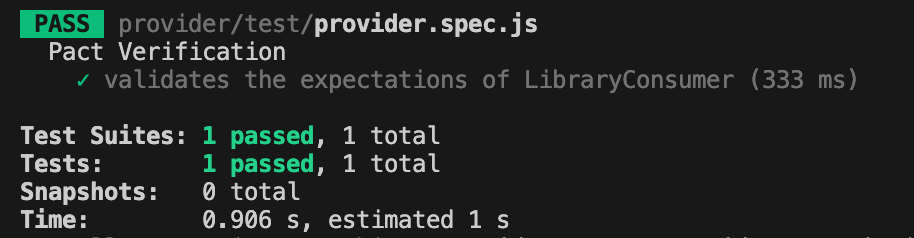
    If everything set up correctly you should get one test passing:

    Conclusion

    Today, we explored a practical implementation of the consumer-driven contract testing approach. We created test cases for both the consumer and provider and stored the contract in the same repository.

    But you might be wondering—what if the consumer’s and provider’s repositories are separate, unlike our case? Since these two microservices are independent, the contract needs to be accessible to both. So, where should it be stored?

    Let’s to explore possible solution in the next part.

    Bye for now! Hope you enjoyed it!

  • Contract Testing: Who’s Who in the Process

    Contract Testing: Who’s Who in the Process

    Introduction

    Today, I want to introduce you to the concept of contract testing using an analogy—buying the house of your dreams 🏡. Whether you already own your dream home or are still searching for it, you probably know the excitement and anticipation that comes with the process.

    Imagine you’ve finally found the perfect house. You’re happy to move forward, but before the keys are in your hand, it’s crucial to set clear expectations with the seller. This involves agreeing on the details: the price, the condition of the house, and any other terms. To formalize this, a contract is drawn up, and a neutral party, like a notary or bank, helps ensure everything is clear and fair.

    This scenario mirrors contract testing in software development, where a consumer (the buyer) and a provider (the seller) agree on a contract to ensure their interactions meet expectations. The contract broker (like the notary) acts as a mediator to validate and enforce these agreements.

    Let’s break this analogy down further.

    Consumer.

    In this scenario you’re a consumer. You have specific expectations: size, number of rooms, location, price, neighbourhood, etc. 

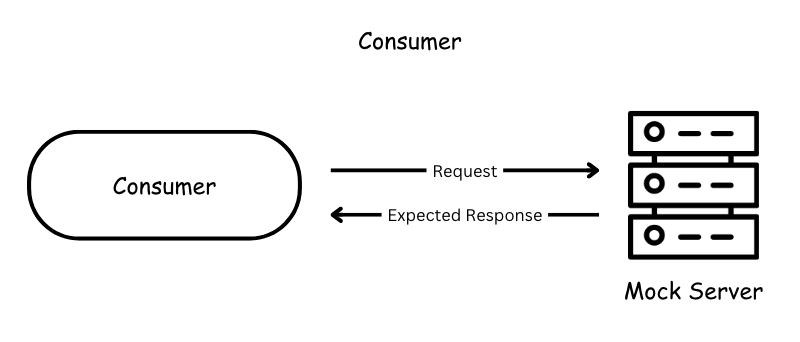
    In contract testing, the consumer is a service or application that needs to consume data or services from a provider. The consumer is usually a web or mobile application making a request to a backend service, also it could be another service calling a backend service.  

    A consumer test verifies that the consumer correctly creates requests, handles provider responses as expected, and uncovers any misunderstandings about the provider’s behavior.

    Provider

    Then, the seller is the person offering the house. They promise certain features in the house: a garden, a modern kitchen, friendly neighbourhood and so on. 

    Provider on the other side of the consumer in contract testing that promises to deliver specific data or functionality. Usually it is a backend service. 

    Contract

    The contract is the written agreement between you and the seller. It ensures both parties understand and agree on what is being provided and what is expected (e.g., the price, delivery date, features of the house).

    The contract is no different in software. The contract is a formal agreement between the consumer and provider about how they will interact (e.g., API specifications, request/response formats).

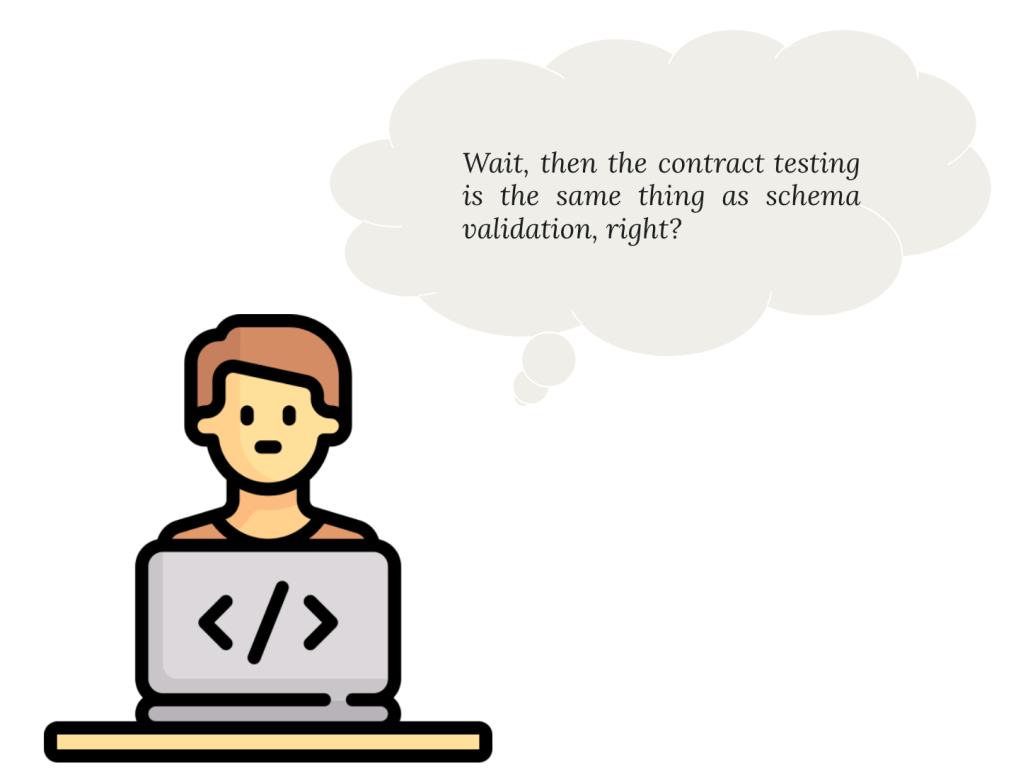
    Hmmm.. not really! Contract isn’t the same as JSON Schema. This article explains well the difference between schema-based and contract-based testing. 

    In short: A schema is a structural blueprint or definition of how data in JSON is organized. It describes the structure, format, and relationships of data. 

    But the schema does not specify how the data should be used, when it should be provided, or how the interaction between the consumer and provider should behave. It’s purely about the data format and structure.

    A contract includes the schema but also goes beyond it to define the behavioral and interaction agreements between the consumer and provider.

    Contract includes following data:

    • The name of the consumer and provider
    • Data requirements for the request
    • Interactions between consumer and provider
    • Matching rules for the dynamic values
    • Environment and deployment information

    Contract Broker

    The contract broker, like a bank or notary, helps validate and mediate the agreement. They ensure that both parties adhere to their commitments.

    In contract testing, the contract broker could be a tool or framework (e.g., Pact) that stores and validates contracts. It ensures the provider and consumer stick to their agreed-upon specifications.

    The broker helps verify the compatibility between the two parties independently, ensuring that both can work together smoothly.

    Can-I-Deploy Tool

    To enable consumers and providers to check if they can deploy their changes to production, Pact provides a command-line interface (CLI) tool called can-i-deploy, which enables consumer and provider to determine the verification status of the contract.

    Contract testing approaches

    There are mainly two ways to approach contract testing:

    • The consumer-driven contract testing (CDCT) approach
    • The provider-driven contract testing (PDCT) approach

    In these series I am going to discuss traditional CDCT approach.

    Consumer-Driven Testing

    In the consumer-driven approach the consumer is driving the contract. As a consumer before finalizing the house purchase, you might inspect the house to confirm it meets your expectations and publish your expectations as a contract to the broker. On another side,  the seller must ensure their house is as described in the contract and ready for sale. This is like provider-side testing, ensuring they deliver what the contract specifies.

    Contract testing ensures that consumers (buyers) and providers (sellers) are on the same page regarding their expectations and deliverables, with a broker (notary or bank) facilitating the process. This approach reduces the risk of miscommunication and ensures smooth collaboration—whether you’re buying a house or building software systems.

    Conclusion

    Contract testing acts as the bridge between consumers and providers, ensuring smooth collaboration. Much like finalizing the purchase of your dream house, both parties agree on a contract that outlines expectations and deliverables, with a broker ensuring everything aligns. Whether you’re buying a house or developing software, clear agreements lead to smoother outcomes!

    Next, we’ll explore the application under test and hit the ground running with implementation!

  • “Shift-Left” Testing Strategy with Contract Testing. Introduction.

    “Shift-Left” Testing Strategy with Contract Testing. Introduction.

    The Inspiration Behind This Series

    At the end of 2024, I ordered a book Contract Testing in Action and had been waiting for the right moment to start exploring. Recently, I finally read through most of its chapters and found its insights to be handy for development teams working with microservice architectures. Inspired by the knowledge and ideas from the book, I decided to write a series of articles to share what I’ve learned and explore how these concepts can be effectively applied in real-world scenarios. This introductory article serves as the starting point, explaining what contract testing is and how it fits into a broader testing strategy.


    Testing Strategy for Microservices.

    Over the past few decades, microservice architecture became a crucial way of building modern, scalable, and reliable applications. Traditional monolithic systems, where the database and all business logic seats under a single, tightly coupled structure, have gradually taken a backseat. In their place, independently deployable and modular services—known as microservices — have became the foundation of contemporary software development. This shift enables product teams to deliver features faster and more efficiently. However, with this huge leap comes the challenge with ensuring that each microservice operates correctly both in isolation and as part of larger systems. So, planning and executing testing strategies becomes an important component of the development lifecycle. 

    The most widespread scheme of testing of any system is the one which is proposed by  Mike Cohn in his book ‘Succeeding with Agile’.

    Source: https://semaphoreci.com/blog/testing-pyramid

    Microservices often rely on APIs to exchange data, with some services acting as providers (offering data) and others as consumers (requesting and processing data). Without a clear and tested agreement—or contract—between these services, even minor changes in one service can lead to failures across the system. This is where contract testing becomes invaluable and should be included into the pyramid as well. 

    Here is the adjusted version of the pyramid:

    Why is contract testing so important?

    Let’s take a real-life example with a banking application. Imagine a banking application with the following teams and components:

    1. Frontend Application (Consumer):
      Built by a frontend team, this React-based web app allows customers to view their account balance and transaction history by making API calls to the backend.
    2. Backend API (Provider):
      Managed by a backend team, the API provides endpoints for account details, including:
      • /account/{id}/balance – Returns the account balance.

    The frontend app is integrated with the backend API, expecting the following responses:

    Account Balance Endpoint (GET /account/{id}/balance):

    {
      "accountId": "12345",
      "balance": 5000
    }

    On Friday Evening the backend engineer decides to improve the /account/{id}/balance response to rename accountId to id. The new response structure looks like this:

    {
      "id": "12345",
      "balance": 5000
    }

    The engineer deploys the change, thinking it’s a harmless addition. No contract tests are in place to verify compatibility with the frontend.

    Result:

    The frontend app’s code does not recognise the renamed accountId field and instead tries to access id under the old key. This results in an error when parsing the JSON response, as the frontend is still expecting the accountId field. As a result, the frontend fails to display the account balance and shows a blank page or an error message to customers.

    Impact Over the Weekend:

    • Customers are unable to check their account balance, leading to frustration and confusion.
    • The frontend team was unaware of the backend change until Monday morning, as there were no contract tests in place to alert them about the breaking change.
    • The downtime disrupts the customer experience, potentially destroying trust in the banking application and impacting the reputation of the service.

    What could be done better?

    With contract testing, the frontend and backend teams define a clear agreement (the “contract”) about API interactions, specifying expected fields and data types. Before deployment, both consumer (frontend) and provider (backend) teams run tests to ensure compatibility, catching issues early. By integrating contract tests into the CI/CD pipeline, breaking changes are flagged during development or staging, preventing them from reaching production. This approach ensures smooth communication between services, reduces downtime, and enforces better collaboration between teams.

    What is Contract Testing in a nutshell?

    Contract testing is a technique for testing an integration point by checking each application in isolation to ensure the messages it sends or receives conform to a shared understanding that is documented in a “contract”.

    Source: Pact Documentation.

    The contract is a JSON file containing the names of the two interacting systems: in this case, the web application and backend server. The contract also lists all interactions between the two systems. 

    In the context of the test automation pyramid, contract testing bridges the gap between unit tests and end-to-end tests by focusing on the interactions between microservices. It ensures that the consumer and provider services adhere to a shared agreement (the “contract”) regarding APIs, such as expected request and response structures. By having contract testing in place, it proactively identifies and addresses these compatibility problems earlier in the development cycle.

    There is an insightful diagram in the book “Contract Testing in Action” that illustrates how some test cases can be shifted to contract tests. This shift moves them lower in the test automation pyramid, enabling issues to be identified earlier in the development lifecycle. 

    Source: Contract Testing in Action book

    As microservices continue to dominate the landscape of software development, adopting contract testing is no longer optional—it is essential. By incorporating this practice, teams can build scalable, reliable, and user-focused applications, providing a smooth experience for end users and ensuring strong collaboration across development teams.

    In the upcoming articles, we will meet contract testing players and focus on the practical implementation of contract testing, exploring tools, techniques, and best practices to integrate testing strategy into development workflow.

    As I continue learning, I also began compiling a repository of helpful resources on contract testing to serve as a reference for myself and others exploring this topic.