Tag: web-development

  • What makes PactumJS awesome? A quick look at its best features.

    What makes PactumJS awesome? A quick look at its best features.

    1. Introduction
      1. Fluent and expressive syntax
      2. Data Management
        1. Data Templates
        2. Data Store for Dynamic Values
      3. Built-In Schema Validation
      4. Flexible Assertions
      5. Default Configuration 
    2. Conclusion
    3. Resources

    Introduction

    I’ve spent a fair bit of time writing API test automation. After exploring a few JavaScript-based tools and libraries, I’ve found Pactum to be particularly powerful. I wanted to take a moment to share a brief overview of my experience and why I think it stands out.

    If you’re setting up a PactumJS project from scratch, I recommend starting with the official Quick Start guide, which covers installation and basic setup clearly. Additionally, this article by Marie Cruz offers a great walkthrough of writing API tests with PactumJS and Jest, especially useful for beginners.

    Fluent and expressive syntax

    One of the aspects I appreciate the most is how naturally you can chain descriptive methods from the spec object to build complex requests with support for headers, body payloads, query parameters, and more.

    Example: 

    it('POST with existing username and valid password', async () => {
            await spec()
                .post('/auth/login')             .inspect()
                .withHeaders('Content-Type', 'application/json')
                .withJson({
                    '@DATA:TEMPLATE@': 'ExistingUser'
                })
                .expectStatus(200) # assertion
                .expectJsonSchema(authenticationSchema) # assertion
        })
    

    More on request making: https://github.com/pactumjs/pactum/wiki/API-Testing#request-making 

    Data Management

    Data Management is a critical aspect of test automation and often one of the more challenging pain points in any automation project. Test suites frequently reuse similar request payloads, making it difficult to maintain and organize these payloads when they are scattered across different test files or folders. Without a structured approach, this can lead to duplication, inconsistency, and increased maintenance overhead. So, it is important to have an intuitive way to handle data in the test framework. 

    In PactumJS, data management is typically handled using data templates and data stores. These help you define reusable request bodies, dynamic data, or test user information in a clean and maintainable way.

    Data Templates

    Data Templates help you define reusable request bodies and user credentials. Templates can also be locally customized within individual tests without affecting the original definition.

    For example, in testing different authentication scenarios:

    1. Valid credentials
    2. Invalid password
    3. Non-existing user

    Rather than hard-coding values in each test, as it is done below: 

    describe('/authenticate', () => {
        it('POST with existing username and valid password', async () => {
            await spec()
                .post('/auth/login')
                .inspect()
                .withHeaders('Content-Type', 'application/json')
                .withJson({
                    username: process.env.USERNAME,
                    password: process.env.PASSWORD,
                })
                .expectStatus(200)
                .expectJsonSchema(authenticationSchema)
        })
    
        it('POST with existing username and invalid password', async () => {
            await spec()
                .post('/auth/login')
                .inspect()
                .withHeaders('Content-Type', 'application/json')
                .withJson({
                    username: process.env.USERNAME,
                    password: faker.internet.password(),
                })
                .expectStatus(401)
                .expectJsonMatch('error', 'Invalid credentials')
        })
    
        it('POST with non-existing username and password', async () => {
            await spec()
                .post('/auth/login')
                .inspect()
                .withHeaders('Content-Type', 'application/json')
                .withJson({
                    username: faker.internet.username(),
                    password: faker.internet.password(),
                })
                .expectStatus(401)
                .expectJsonMatch('error', 'Invalid credentials')
        })
    })

    define reusable templates:

    // auth.js
    
    export function registerAuthTemplates() {
      stash.addDataTemplate({
        ExistingUser: {
            username: process.env.USERNAME,
            password: process.env.PASSWORD,
        },
        NonExistingUser: {
            username: faker.internet.username(),
            password: faker.internet.password(),
        }
    });
    }

    Then load them in global setup:

    // registerDataTemplates.js
    
    import { registerAuthTemplates } from "./auth.js";
    
    export function registerAllDataTemplates() {
        registerAuthTemplates();
      }

    Now, tests become cleaner and easier to maintain:

     it('POST with non-existing username and password', async () => {
            await spec()
                .post('/auth/login')
                .inspect()
                .withHeaders('Content-Type', 'application/json')
                .withJson({
                    '@DATA:TEMPLATE@': 'NonExistingUser'
                })
                .expectStatus(401)
                .expectJsonMatch('error', 'Invalid credentials')
        })

    Want to override part of a template? 

    Use @OVERRIDES@:

     it('POST with existing username and invalid password', async () => {
            await spec()
                .post('/auth/login')
                .inspect()
                .withHeaders('Content-Type', 'application/json')
                .withJson({
                    '@DATA:TEMPLATE@': 'ExistingUser',
                    '@OVERRIDES@': {
                        'password': faker.internet.password()
                      }
                })
                .expectStatus(401)
                .expectJsonMatch('error', 'Invalid credentials')
        })

    This approach improves consistency and reduces duplication. When credential details change, updates can be made centrally in the datafactory without touching individual tests. As a result, test logic remains clean, focused on validating behaviour rather than being cluttered with data setup.

    More information on data templates: https://pactumjs.github.io/guides/data-management.html#data-template 

    Data Store for Dynamic Values

    In integration and e2e API testing, one common challenge is managing dynamic data between requests. For example, you might need to extract an authentication token from an authentication response and use it in the header of subsequent requests. Without a clean way to store and reuse this data, tests can become messy, brittle, and hard to maintain.

    PactumJS provides a data store feature that allows you to save custom response data during test execution in a clean way.

    Example:

    Suppose you want to send a POST request to create a room, but the endpoint requires authentication. First, you make an authentication request and receive a token in the response. Using data store functionality, you can capture and store this token, then inject it into the headers of the room creation request. 

    describe('POST Create a New Room', () => {
    
        beforeEach(async () => {
            await spec()
                .post('/auth/login')
                .withHeaders('Content-Type', 'application/json')
                .withJson({
                    '@DATA:TEMPLATE@': 'ExistingUser'
                }).stores('token', 'token')
        });
    
    
        it('POST: Create a New Room', async () => {
            await spec()
                .post('/room')
                .inspect()
                .withHeaders('Content-Type', 'application/json')
                .withHeaders('Cookie', 'token=$S{token}')
                .withJson({ '@DATA:TEMPLATE@': 'RandomRoom' })
                .expectStatus(200)
                .expectBody({
                    "success": true
                })
    
    })

    Data store functionality also supports json-query libraries. It enables you to extract and store specific values from complex JSON responses. This is particularly helpful when dealing with nested structures, where you only need to capture a portion of the response—such as an ID, token, or status—from a larger payload.

    Example:

    await spec()
                .get('/room')
                .inspect()
                .withHeaders('Content-Type', 'application/json')
                .expectStatus(200)
                .stores('roomId', `rooms[roomName=${roomName}].roomid`);
    
            await spec()
                .get(`/room/$S{roomId}`)
                .inspect()
                .withHeaders('Content-Type', 'application/json')
                .expectStatus(200)
                .expectJson('roomName', roomName);
        })

    More on data store: https://pactumjs.github.io/guides/data-management.html#data-store 

    Built-In Schema Validation

    Unlike other setups that require integrating libraries like zod, ajv, or custom helper functions, PactumJS allows you to validate JSON responses using the expectJsonSchema method. All you need to do is define the expected schema and apply it directly in your test, no extra configuration needed.

    For example, in an authentication test case, the response schema is defined in a separate data factory:

    export const authenticationSchema = {
        "type": "object",
        "properties": {
            "token": {
                "type": "string"
            }
        },
        "additionalProperties": false,
        "required": ["token"]
    }

    You can then validate the structure of the response like this:

    it('POST with existing username and valid password', async () => {
            await spec()
                .post('/auth/login')
                .inspect()
                .withHeaders('Content-Type', 'application/json')
                .withJson({
                    '@DATA:TEMPLATE@': 'ExistingUser'
                })
                .expectStatus(200)
                .expectJsonSchema(authenticationSchema)
        })

    Flexible Assertions

    Most REST API responses return data in JSON format that must be validated. Fortunately, PactumJS provides a powerful and expressive assertion system that goes far beyond basic status code checks. Its assertion system allows for 

    1. Deep JSON matching:
    await spec()
        .get(`/room/$S{roomId}`)
        .inspect()
        .expectStatus(200)
        .expectJson('roomName', roomName);
    })
    it('POST with non-existing username and password', async () => {
         await spec()
            .post('/auth/login')
            .inspect()
            .withJson({
                '@DATA:TEMPLATE@': 'NonExistingUser'
            })
            .expectStatus(401)
            .expectJsonMatch('error', 'Invalid credentials')
        })
    1. Partial comparisons:
    it('posts should have a item with title -"some title"', async () => {
      const response = await pactum.spec()
        .get('https://jsonplaceholder.typicode.com/posts')
        .expectStatus(200)
        .expectJsonLike([
          {
            "userId": /\d+/,
            "title": "some title"
          }
        ]);
    });
    1. Path-Based Validation:
    it('get people', async () => {
      const response = await pactum.spec()
        .get('https://some-api/people')
        .expectStatus(200)
        .expectJson({
          people: [
            { name: 'Matt', country: 'NZ' },
            { name: 'Pete', country: 'AU' },
            { name: 'Mike', country: 'NZ' }
          ]
        })
        .expectJsonAt('people[country=NZ].name', 'Matt')
        .expectJsonAt('people[*].name', ['Matt', 'Pete', 'Mike']);
    });
    1. Dynamic Runtime Expressions:
    it('get users', async () => {
      await pactum.spec()
        .get('/api/users')
        .expectJsonLike('$V.length === 10'); // api should return an array with length 10
        .expectJsonLike([
          {
            id: 'typeof $V === "string"',
            name: 'jon',
            age: '$V > 30' // age should be greater than 30
          }
        ]);
    });

    And all of them are in a clean and readable format. 

    For example, you can validate only parts of a response, use regex or custom matchers, and even plug in JavaScript expressions or reusable assertion handlers. In my opinion, this level of granularity is a game-changer compared to assertion styles in other frameworks.

    Check more in the official documentation: https://github.com/pactumjs/pactum/wiki/API-Testing#response-validation 

    Default Configuration 

    To reduce repetition and keep tests clean, PactumJS allows you to define default values that apply globally across your test suite — such as headers, base URL, and request timeouts. This helps maintain consistency and simplifies test configuration.

    Here’s how it can be implemented:

    before(() => {
      request.setBaseUrl(process.env.BASE_URL);
      request.setDefaultHeaders('Content-Type', 'application/json');
    });

    More information you can find here: https://github.com/pactumjs/pactum/wiki/API-Testing#request-settings 

    Conclusion

    In my experience, PactumJS has proven to be a well-designed and developer-friendly tool for API test automation. Its fluent syntax, robust data handling, and built-in features like schema validation and dynamic stores eliminate the need for developing third-party solutions for the test framework.

    If you’re working with API testing in JavaScript / Typescript, PactumJS is definitely worth a look.

    Resources

    1. You can find the complete set of test cases, data templates, and helper functions shown in this post in the GitHub Repo
    2. Official PactumJS Documentation: https://pactumjs.github.io/ 
    3. PactumJS WiKi Page: https://github.com/pactumjs/pactum/wiki/API-Testing 
    4. Code Examples in PactumJS GitHub: https://github.com/pactumjs/pactum-examples 
  • Consumer-Driven Contract Testing in Practice

    Consumer-Driven Contract Testing in Practice

    Introduction

    In the previous article consumer-driven contract testing has been introduced. And at this point, I am sure you can’t wait to start actual implementation. So let’s not delay any further!

    Let’s start with the implementation using Pact. 

    Based on official documentation, Pact is a code-first tool for testing HTTP and message integrations using contract tests.

    As a system under test we are going to use consumer-provider applications written in JavaScript. You can find the source code in the GitHub Repository.

    Consumer Tests

    The focus of the consumer test is the way to check if the consumer’s expectations match what the provider does. These tests are not supposed to verify any functionality of the provider, instead focus solely on what the consumer requires and validate whether those expectations are met.

    Loose Matchers

    To avoid brittle and flaky tests, it is important to use loose matchers as a best practice. This makes contract tests more resilient to minor changes in the provider’s response. Generally, the exact value returned by the provider during verification is not critical, as long as the data types match (Pact documentation). However, an exception can be made when verifying a specific value in the response.

    Pact provides several matchers that allow flexible contract testing by validating data types and structures instead of exact values. Key loose matchers can be found in the Pact documentation.

    Example without loose matchers (strict matching):

    describe("getBook", () => {
        test("returns a book when a valid book id is provided", async () => {
    
            await provider.addInteraction({
                states: [{ description: "A book with ID 1 exists" }],
                uponReceiving: "a request for book 1",
                withRequest: {
                    method: "GET",
                    path: "/books/1",
                },
                willRespondWith: {
                    status: 200,
                    headers: { "Content-Type": "application/json" },
                    body: {
                        id: 1,
                        title: "To Kill a Mockingbird",
                        author: "Harper Lee",
                        isbn: "9780446310789"
                    },
                },
            })
    
            await provider.executeTest(async (mockService) => {
                const client = new LibraryClient(mockService.url)
                const book = await client.getBook(1)
                expect(book).toEqual(expectedBook)
            })
        })
    })

    Problem: This test will fail if id, title, or author, isbn  changes even slightly.

    Example with loose matchers (flexible and maintainable):

    Using Pact matchers, we allow the provider to return any valid values of the expected types:

    describe("getBook", () => {
        test("returns a book when a valid book id is provided", async () => {
          const expectedBook = { id: 1, title: "To Kill a Mockingbird", author: "Harper Lee", isbn: "9780446310789" }
    
          await provider.addInteraction({
            states: [{ description: "A book with ID 1 exists" }],
            uponReceiving: "a request for book 1",
            withRequest: {
              method: "GET",
              path: "/books/1",
            },
            willRespondWith: {
              status: 200,
              headers: { "Content-Type": "application/json" },
              body: like(expectedBook),
            },
          })
    
          await provider.executeTest(async (mockService) => {
            const client = new LibraryClient(mockService.url)
            const book = await client.getBook(1)
            expect(book).toEqual(expectedBook)
          })
        })
      })
    

    In this case the contract remains valid even if actual values change, validation focused only on ensuring that data types and formats are correct.

    Steps to write consumer contract tests

    Scenarios:

    1. Validate that LibraryClient.getAllBooks() retrieves a list of books.
    2. Validate that LibraryClient.getBook(id) correctly fetches a single book when given a valid ID.

    To start with hands-on, you have to clone the repository with the consumer and provider.

    To start with consumer, open consumer.js file. Inside you can find the LibraryClient class represents the consumer in a consumer-driven contract testing setup. It acts as a client that interacts with an external Library API (provider) to fetch and manage book data.

    There are a few functions present:

    1. getBook(id) – Fetches a single book by its id. Returns the data in JSON format.
    2. getAllBooks() – Fetches all books from the API. Returns a list of books in JSON format.
    3. addBook(title, author, isbn) – Sends a POST request to add a new book. Returns the newly created book’s details.

    Writing the first consumer contract test:

    1. Importing the required dependencies and Consumer Class.
    const path = require('path');
    const { PactV3, MatchersV3 } = require('@pact-foundation/pact');
    const LibraryClient = require('../src/client');
    1. Setting up the mock provider
    const provider = new PactV3({
        dir: path.resolve(process.cwd(), 'pacts'),
        consumer: "LibraryConsumer",
        provider: "LibraryProvider"
    })

    The code above creates a Pact mock provider (provider) using PactV3 library where specifies:

    • LibraryConsumer as the name of the consumer (the client making requests).
    • LibraryProvider as the name of the provider (the API responding to requests).
    • Passing parameter dir to define directory for the contract to be stored. 
    1. Setting up the interaction of the consumer and mock provider and register consumer expectations.
    const EXPECTED_BOOK = { id: 1, title: "To Kill a Mockingbird", author: "Harper Lee", isbn: "9780446310789" }
    
    describe("getAllBooks", () => {
        test("returns all books", async () => {
    
            provider
                .uponReceiving("a request for all books")
                .withRequest({
                    method: "GET",
                    path: "/books",
                })
                .willRespondWith({
                    status: 200,
                    body: MatchersV3.eachLike(EXPECTED_BOOK),
                })
    
            await provider.executeTest(async (mockService) => {
                const client = new LibraryClient(mockService.url)
                const books = await client.getAllBooks()
                expect(books[0]).toEqual(EXPECTED_BOOK)
            })
        })
    })
    
    describe("getBook", () => {
        test("returns a book when a valid book id is provided", async () => {
    
            provider
                .given('A book with ID 1 exists')
                .uponReceiving("a request for book 1")
                .withRequest({
                    method: "GET",
                    path: "/books/1",
                })
                .willRespondWith({
                    status: 200,
                    body: MatchersV3.like(EXPECTED_BOOK),
                }),
    
            await provider.executeTest(async mockProvider => {
                const libraryClient = new LibraryClient(mockProvider.url)
                const book = await libraryClient.getBook(1);
                expect(book).toEqual(EXPECTED_BOOK);
            })
        })
    })
    • First we define the expected book. This object represents a single book that we expect the API to return. It acts as a template for what a book response should look like.
    • provider.addInteraction({...}) sets up a mock interaction.
    • uponReceiving: Describes what the test expects.
    • withRequest: Defines the expected request details:
    1. Method: GET
    2. Endpoint: /books
    • willRespondWith: Defines the expected response:
    1. Status Code: 200
    2. Body: MatchersV3.eachLike(EXPECTED_BOOK)
    3. eachLike(EXPECTED_BOOK): Ensures the response contains an array of objects that match the structure of EXPECTED_BOOK.

    4. Calling the consumer against the mock provider:

            await provider.executeTest(async mockProvider => {
                const libraryClient = new LibraryClient(mockProvider.url)
                const book = await libraryClient.getBook(1);
                expect(book).toEqual(EXPECTED_BOOK);
            })

    Now, you are ready to run the test! First, create a new script in our package.json file called test:consumer, which uses jest command followed by the test file you want to execute: 

    "test:consumer": "jest consumer/test/consumer.test.js",

    Save the changes and run tests by executing this command:

    npm run test:consumer

    If everything set up correctly you should get one test passing:

    If the test passes, a contract is generated and saved in the pacts folder. If it fails, the contract cannot be created.

    The content of the contract should include the information about the consumer, provider, interaction which have been set up, the request and response details expected from the provider, matching rules and any other relevant information. 

    {
      "consumer": {
        "name": "LibraryConsumer"
      },
      "interactions": [
        {
          "description": "a request for all books",
          "request": {
            "method": "GET",
            "path": "/books"
          },
          "response": {
            "body": [
              {
                "author": "Harper Lee",
                "id": 1,
                "isbn": "9780446310789",
                "title": "To Kill a Mockingbird"
              }
            ],
            "headers": {
              "Content-Type": "application/json"
            },
            "matchingRules": {
              "body": {
                "$": {
                  "combine": "AND",
                  "matchers": [
                    {
                      "match": "type",
                      "min": 1
                    }
                  ]
                }
              }
            },
            "status": 200
          }
        },
        {
          "description": "a request for book 1",
          "providerStates": [
            {
              "name": "A book with ID 1 exists"
            }
          ],
          "request": {
            "method": "GET",
            "path": "/books/1"
          },
          "response": {
            "body": {
              "author": "Harper Lee",
              "id": 1,
              "isbn": "9780446310789",
              "title": "To Kill a Mockingbird"
            },
            "headers": {
              "Content-Type": "application/json"
            },
            "matchingRules": {
              "body": {
                "$": {
                  "combine": "AND",
                  "matchers": [
                    {
                      "match": "type"
                    }
                  ]
                }
              }
            },
            "status": 200
          }
        }
      ],
      "metadata": {
        "pact-js": {
          "version": "11.0.2"
        },
        "pactRust": {
          "ffi": "0.4.0",
          "models": "1.0.4"
        },
        "pactSpecification": {
          "version": "3.0.0"
        }
      },
      "provider": {
        "name": "LibraryProvider"
      }
    }

    Provider tests

    The primary goal of provider contract tests is to verify the contract generated by the consumer. Pact provides a framework to retrieve this contract and replay all registered consumer interactions to ensure compliance. The test is run against the real service.

    Provider States

    Before writing provider tests, I’d like to introduce another useful concept: provider states.

    Following best practices, interactions should be verified in isolation, making it crucial to maintain context independently for each test case. Provider states allow you to set up data on the provider by injecting it directly into the data source before the interaction runs. This ensures the provider generates a response that aligns with the consumer’s expectations.

    The provider state name is defined in the given clause of an interaction on the consumer side. This name is then used to locate the corresponding setup code in the provider, ensuring the correct data is in place.

    Example

    Consider the test case: “A book with ID 1 exists.”

    To ensure the necessary data exists, we define a provider state inside stateHandlers, specifying the name from the consumer’s given clause:

                stateHandlers: {
                    "A book with ID 1 exists": () => {
                        return Promise.resolve("Book with ID 1 exists")
                    },
                },

    On the consumer side, the provider state is referenced in the given clause:

            provider
                .given('A book with ID 1 exists')
                .uponReceiving("a request for book 1")
                .withRequest({
                    method: "GET",
                    path: "/books/1",
                })
                .willRespondWith({
                    status: 200,
                    body: MatchersV3.like(EXPECTED_BOOK),
                }),

    This setup ensures that before the interaction runs, the provider has the necessary data, allowing it to return the expected response to the consumer.

    Writing provider tests

    1. Importing the required dependencies
    const { Verifier } = require('@pact-foundation/pact');
    const app = require("../src/server.js");

    2. Running the provider service

    const server = app.listen(3000)

    3. Setting up the provider options

            const opts = {
                provider: "LibraryProvider",
                providerBaseUrl: "http://localhost:3000",
                publishVerificationResult: true,
                providerVersion: "1.0.0",
            }

    4. Writing the provider contract test. After setting up the provider verifier options, let’s write the actual provider contract test using Jest framework. 

            const verifier = new Verifier(opts);
    
            return verifier
                .verifyProvider()
                .then(output => {
                    console.log('Pact Verification Complete!');
                    console.log('Result:', output);
                })

    5. Running the provider contract test

    Before running tests, you have to create a new script in the package.json file called test:provider, which uses jest command followed by the test file you want to execute: 

    "test:provider": "jest provider/test/provider.spec.js"

    Save the changes and run tests by executing this command:

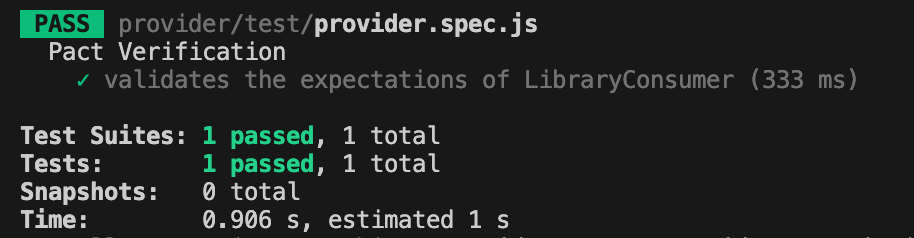
    npm run test:provider

    If everything set up correctly you should get one test passing:

    Conclusion

    Today, we explored a practical implementation of the consumer-driven contract testing approach. We created test cases for both the consumer and provider and stored the contract in the same repository.

    But you might be wondering—what if the consumer’s and provider’s repositories are separate, unlike our case? Since these two microservices are independent, the contract needs to be accessible to both. So, where should it be stored?

    Let’s to explore possible solution in the next part.

    Bye for now! Hope you enjoyed it!