Tag: testing

  • Key Aspects I Consider in Automation Project Code Reviews.

    Key Aspects I Consider in Automation Project Code Reviews.

    Recently, I’ve been involved in conducting code reviews for my team’s end-to-end test automation project, which utilizes Playwright technology. I dedicate about a couple of hours each day to this task, either by reviewing others’ code or by responding to feedback on my own pull requests. 

    I firmly believe that we as test automation engineers should approach test automation as any kind of software because test automation is software development. Software developers should have solid knowledge on tools and best practices like: coding and naming standards, configuration management, code review practices, modularization, abstraction, static analysis tools, SOLID and DRY principles, etc. A well-established code review process is one of the success points while working on the test automation projects. You might find a lot of best resources on how to conduct code review: code reviews best practices by Google, by GitLab and others. In this article, I would like to point out several aspects I pay attention to while reviewing test automation code in addition to standard guidelines. 

    Automate what can be automated!

    Make your life easier 🙂 Automation can significantly simplify managing run-time errors, stylistic issues, formatting challenges, and more. Numerous tools are available to assist with this. For a Playwright project using TypeScript, I recommend installing and configure the following:

    • ESLint: This tool performs static analysis of your code to identify problems. ESLint integrates with most IDEs and can be implemented as part of your CI/CD pipeline.
    • Prettier: A code formatter that is helpful in enforcing a consistent format across your codebase.
    • Husky: Facilitates the easy implementation of Git hooks.

    In this detailed guide by Butch Mayhew you can find all the information you need to install and configure these tools in your project.

    Identify easy to spot issues first

    First thing you have to look for is any preliminary checks required for the PR to be merged, like: merge conflicts, outdated branches, failed static analysis tools or formatter checks. Then you might briefly look for easy to spot poor coding practices and errors: naming convention, redundant debug lines (for example, console.log()), formatting, long or complex functions, unnecessary comments, typos and so on. Moreover, you might spot violation of agreed rules within the team, like test case id or description, etc. 

    Verify that each test should focus on a single aspect. 

    The general guideline is that tests should contain only one assertion, reflecting the primary objective of the test. For example, if you’re verifying that a button is correctly displayed and functional on the UI, the test should be limited to that specific check.

    Here’s an example using Playwright for a TypeScript project:

    import { test, expect } from '@playwright/test'; 
    
    test('should display and enable the submit button', async ({ page }) => {        
     await page.goto('https://example.com'); 
     const submitButton = page.locator('#submit-button'); 
     await expect(submitButton).toBeVisible(); 
     await expect(submitButton).toBeEnabled(); 
    });


    Additionally, name the test to reflect its purpose, capturing the intent rather than the implementation details.

    Separation of concerns

    Separation of concerns is a fundamental design principle that we might need to stick to. When structuring code with functions and methods, it’s crucial to determine the appropriate scope for each. Ideally, a function should do one thing and one thing only. Following this approach, you will achieve a distinct and manageable codebase.

    In UI testing, the most popular approach for maintaining separation of concerns is the Page Object Pattern. This pattern separates the code that interacts with the DOM from the code that contains the test steps and assertions.

    Proper separation of concerns within tests also means placing setup and teardown steps in separate functions or methods or beforeEach or afterEach steps. This practice makes it easier to understand the core validation of the test without being distracted by the preparatory steps. Importantly, setup and teardown functions should avoid assertions; instead, they should throw exceptions if errors occur. This approach ensures that the primary focus of the test remains on its intended verification.

    Is the locator / selector strategy solid?

    A solid locator/selector strategy is crucial for ensuring that your tests are stable and maintainable. This means using selectors that are resilient to changes in the UI and are as specific as necessary to avoid false positives. It’s important to explore framework-specific best practices for locator or selector strategies. For example, Playwright best practices recommend using locators and user-facing attributes.

    To make your test framework resilient to DOM changes, avoid relying on the DOM structure directly. Instead, use locators that are resistant to DOM modifications:

    page.getByRole(‘button’, { name: ‘submit’ });

    Different frameworks may have their own guidelines for building element locating strategies, so it’s beneficial to consult the tool-specific documentation for best practices.

    Hard-coded values.

    Hard-coded values might be dangerous to automation framework flexibility and maintainability in the future. There are a few questions you might ask while reviewing: 

    1. Can we use data models to verify data types at runtime? Consider implementing data models to validate data types during execution, ensuring robustness and reducing errors.
    2. Should this variable be a shared constant? Evaluate if the value is used in multiple places and would benefit from being defined as a constant for easier maintenance.
    3. Should we pass this parameter as an environment variable or external input? This approach can significantly improve configurability and adaptability.
    4. Can we extract this value directly from the API interface? Investigate if the value can be dynamically retrieved from the API, reducing the need for hard-coding and improving reliability.

    Is the code properly abstracted and structured?

    As test automation code tends to grow rapidly, it is important to ensure that common code is properly abstracted and reusable by other tests. Data structures, page objects and API utilities should be separated and organized in the right way. 

    But don’t overuse abstraction and tolerate little duplication in favour of readability.

    Code Comments

    Code comments should not duplicate information the code can provide. Comments should provide context and rationale that the code alone cannot. Additionally, functions and classes should follow a self-explanatory naming convention, making their purpose clear without needing additional comments.

    “Trust, but verify.”

    Don’t rely on an automated test until you’ve seen it fail. If you can’t modify the test to produce a failure, it might not be testing what you intend. Additionally, be wary of unstable test cases that intermittently pass or fail. Such tests need to be improved, fixed, or removed altogether to ensure reliability.

    Communication is the key.

    Navigating the human aspects of code reviews can be as challenging as the technical ones. Here are some strategies that have worked for me when reviewing code.

    1. I often engage with the code by asking clarifying questions. For example:
    • “How does this method work?”
    • “If this requirement changes, what else would need to be updated?”
    • “How could we make this more maintainable?”
    1. Praise the good! Notice when people did something well and praise them for it. Positive feedback from peers is highly motivating. 
    2. Focus on the code, not the person. It’s important to frame discussions around the code itself rather than the person who wrote it. This helps reduce defensiveness and keeps the focus on improving the code quality.
    3. Discuss detailed points in-person. Sometimes, a significant change is easier to discuss face-to-face rather than in written comments. If a discussion is becoming lengthy or complex, I’ll often suggest continuing it in person.
    4. Explain your reasoning. When suggesting changes, it’s helpful to explain why you think the change is necessary and ask if there might be a better alternative. Providing context can prevent suggestions from seeming nit-picky.

    Conclusion

    This is not an exhaustive list of considerations for code reviews. For more guidance, I recommend checking out articles by Andrew Knight and Angie Jones. Their insights can provide additional strategies to enhance your code review process.

  • Part4: Implementing Page Object Pattern to Structure The Test Suite

    Part4: Implementing Page Object Pattern to Structure The Test Suite

    Introduction

    Page object models is a best practice for Playwright to organize test suites by representing various components of a web application. For instance, in the context of a website, pages such as the login , home page, product listings page, etc. can each be encapsulated within a corresponding page objects.

    Breaking down the Page Object: Understanding its Components

    A Page Object serves as a container for all interactions and elements found on a particular web page or a segment of it. Within this structure, there are three fundamental components:

    1. Element Selectors: These serve as the blueprints pinpointing specific elements residing on the web page.
    2. Methods: These functions encapsulate various interactions with the web elements, simplifying complex operations into manageable actions.
    3. Properties: These encompass any supplementary information or attributes pertaining to the page, such as its unique URL or other metadata.

    Step by Step Guide to write POM for the project

    Identify Properties

    Create pages folder. To create an abstraction for common methods and properties, we will first create base.page.ts to hold page property.

    import { Page } from '@playwright/test'

    export class BasePage {
    readonly page: Page;

    constructor(page: Page) {
    this.page = page;
    }
    }

    Then create login.page.ts file which will contain abstraction for Login Page. Extend LoginPage class with BasePage class to inherit page property.

    import { Locator, Page, expect } from '@playwright/test'
    import { BasePage } from '../base.page';

    export class LoginPage extends BasePage {

    constructor(page: Page) {
    super(page);
    }
    };

    Identify Locators

    Add locators for the elements on the Login page:

    import { Locator, Page, expect } from '@playwright/test'
    import { BasePage } from '../base.page';

    export class LoginPage extends BasePage {
    readonly usernameInput: Locator;
    readonly passwordInput: Locator;
    readonly loginButton: Locator;

    constructor(page: Page) {
    super(page);
    this.usernameInput = page.locator('[data-test="username"]');
    this.passwordInput = page.locator('[data-test="password"]');
    this.loginButton = page.locator('[data-test="login-button"]');
    }
    };

    Identify Methods

    Write methods which describe actions you might reuse in test cases:

    import { Locator, Page, expect } from '@playwright/test'
    import { BasePage } from '../base.page';

    export class LoginPage extends BasePage {
    readonly usernameInput: Locator;
    readonly passwordInput: Locator;
    readonly loginButton: Locator;

    constructor(page: Page) {
    super(page);
    this.usernameInput = page.locator('[data-test="username"]');
    this.passwordInput = page.locator('[data-test="password"]');
    this.loginButton = page.locator('[data-test="login-button"]');
    }

    async enterCredentials(username: string, password: string) {
    await this.usernameInput.fill(username);
    await this.passwordInput.fill(password);
    }

    async clickLoginButton() {
    await this.loginButton.click();
    }
    }

    Identify Assertions

    import { Locator, Page, expect } from '@playwright/test'
    import { BasePage } from '../base.page';

    export class LoginPage extends BasePage {
    readonly usernameInput: Locator;
    readonly passwordInput: Locator;
    readonly loginButton: Locator;

    constructor(page: Page) {
    super(page);
    this.usernameInput = page.locator('[data-test="username"]');
    this.passwordInput = page.locator('[data-test="password"]');
    this.loginButton = page.locator('[data-test="login-button"]');
    }

    async enterCredentials(username: string, password: string) {
    await this.usernameInput.fill(username);
    await this.passwordInput.fill(password);
    }

    async clickLoginButton() {
    await this.loginButton.click();
    }

    async IsSignedIn() {
    await expect(this.page.getByText('Products')).toBeVisible();
    }
    }

    Use Page Objects in test cases

    With the abstraction provided by the Page Object, we can easily integrate it into our test cases. This involves initializing the object and invoking its functions whenver needed.

    import { test } from '../utils/fixtures';
    import expect from "@playwright/test"
    import { LoginPage } from "../pages/login/login.page"

    test.beforeEach(async ({page}) => {
    await page.goto('https://www.saucedemo.com/');
    });

    test("login successfully", async ({ page }) => {
    const loginPage = new LoginPage(page);
    await loginPage.enterCredentials("standard_user", "secret_sauce");
    await loginPage.clickLoginButton();
    await loginPage.IsSignedIn();
    });
    }

    Looks good now! However there is one more improvement we can make to avoid duplication of objects initialisation in each and every test case. For this purpose, Playwright provides fixtures which are reusable between test files. You can define pages once and use in all your tests.

    Using Fixtures with Page Object Patterns

    That’s how Playwright’s built-in page fixture could be implemented:

    import { test as base } from "@playwright/test"
    import { LoginPage } from "../pages/login/login.page"

    export const test = base.extend({
    loginPage: async ({page}, use) => {
    // Set up the fixture
    const loginPage = new LoginPage(page);

    // Use the fixture value in the test
    await use(loginPage);
    }
    })

    In order to use fixture, you have to mention fixture in your test function argument, and test runner will take care of it.

    import { test } from '../utils/fixtures';
    import expect from "@playwright/test"

    test.beforeEach(async ({page}) => {
    await page.goto('https://www.saucedemo.com/');
    });

    test("login successfully", async ({ loginPage }) => {
    await loginPage.enterCredentials("standard_user", "secret_sauce");
    await loginPage.clickLoginButton();
    await loginPage.IsSignedIn();
    });
    }

    Fixture helped us to reduce number code lines and improve maintainability.

    Bonus: Create Datafactory to store Users Data and Parametrize Test Case.

    To centralize all the data utilized within our test cases, let’s establish a dedicated location. For this purpose, we will create /datafactory folder and login.data.ts file to store usernames and passwords needed to test an application. Also, important to remember establishing interfaces and types which will validate data we store.

    export interface USERS {
    username: string;
    password: string;
    }

    type userTypes =
    "standard_user" |
    "locked_out_user" |
    "problem_user" |
    "performance_glitch_user"|
    "error_user"|
    "visual_user"

    export const users: Record<userTypes, USERS> = {
    "standard_user": {
    username: "standard_user",
    password: "secret_sauce",
    },
    "locked_out_user": {
    username: "locked_out_user",
    password: "secret_sauce",
    },
    "problem_user": {
    username: "problem_user",
    password: "secret_sauce",
    },
    "performance_glitch_user": {
    username: "performance_glitch_user",
    password: "secret_sauce",
    },
    "error_user": {
    username: "error_user",
    password: "secret_sauce"
    },
    "visual_user": {
    username: "visual_user",
    password: "secret_sauce"
    }
    }

    And the last step: we have to parametrise test case we have with different target users. There are a lot of ways to do so, you can check in documentation for more information. For this demo, I am going to iterate through the object we have and test against each user.

    import { test } from '../utils/fixtures';
    import expect from "@playwright/test"
    import { users } from '../utils/datafactory/login.data';

    test.beforeEach(async ({page}) => {
    await page.goto('https://www.saucedemo.com/');
    });

    for (const userType in users) {
    test(`login successfully with ${userType}`, async ({ page, loginPage }) => {
    await loginPage.enterCredentials(users[userType]["username"], users[userType]["password"]);
    await loginPage.clickLoginButton();
    await loginPage.IsSignedIn();
    });
    }

    Execute Test Cases and Generate a Report.

    Execute Test cases by running npx playwright test command from command line. As a result, report stores parametrised title for each test case by including name of the user.

    Best Practices for Page Object Pattern

    1. Make Pages Small. Break down web pages into smaller, more manageable components to improve readability and maintainability of the page objects, ensuring each object focuses on a specific functionality or section of the page.
    2. Separate Actions and Assertions. Maintain a clear distinction between actions, such as interacting with elements, and assertions, which verify expected outcomes. This separation enhances the clarity and maintainability of test cases, facilitating easier troubleshooting and debugging.
    3. Keep a Minimum Number of Assertions in Test Cases. Limit the number of assertions within each test case to maintain clarity and focus. By reducing complexity, it becomes easier to pinpoint the cause of a failed test case, ensuring that the reason for failure is readily identifiable.

    Conclusion

    In this article, we explored the implementation of the Page Object Model (POM), a powerful design pattern that abstracts crucial elements like page properties, locators, actions, and assertions. When implementing POM in Playwright, it’s essential to keep in mind best practices, such as creating distinct classes for each page, defining methods for user interactions, and integrating these page objects into your tests. Additionally, we also took a look at how to approach data handling and test parametrization.

    Repository with the code you can find here.

  • Part3. Writing your first test case.

    Part3. Writing your first test case.

    Introduction:

    In this tutorial, we are going to explore public website: https://practicesoftwaretesting.com

    More examples of automation testing friendly websites you can find in the repo throughly curated by Butch Mayhew.

    In Playwright, structuring a test suite involves organizing your test cases within descriptive blocks (test.describe) and utilizing setup and teardown functions (test.beforeEach and test.afterEach) to ensure consistent test environments. Here’s a brief description of each component and an example:

    1. test.describe block provides a high-level description of the test suite, allowing you to group related test cases together. It helps in organizing tests based on functionality or feature sets.
    2. Inside test.describe, individual test cases are defined using the test block. Each test block represents a specific scenario or behavior that you want to verify.
    3. test.beforeEach block is used to define setup actions that need to be executed before each test case within the test.describe block. It ensures that the test environment is in a consistent state before each test runs.
    4. test.afterEach block is utilized for defining teardown actions that need to be executed after each test case within the test.describe block. It helps in cleaning up the test environment and ensuring that resources are properly released.

    Here’s an example demonstrating the structure of a test suite in Playwright:

    import { chromium, Browser, Page } from 'playwright';
    
    // Define the test suite
    test.describe('Login functionality', () => {
      let browser: Browser;
      let page: Page;
    
      // Setup before each test case
      test.beforeEach(async () => {
        browser = await chromium.launch();
        page = await browser.newPage();
        await page.goto('https://example.com/login');
      });
    
      // Teardown after each test case
      test.afterEach(async () => {
        await browser.close();
      });
    
      // Test case 1: Verify successful login
      test('Successful login', async () => {
        // Test logic for successful login
      });
    
      // Test case 2: Verify error message on invalid credentials
      test('Error message on invalid credentials', async () => {
        // Test logic for error message on invalid credentials
      });
    });
    

    DOM Terminology

    Before we start writing test cases, it will be useful to brush up our memory on DOM Terminology

    1. HTML tags are simple instructions that tell a web browser how to format text. You can use tags to format italics, line breaks, objects, bullet points, and more. Examples: <input>, <div>, <p>
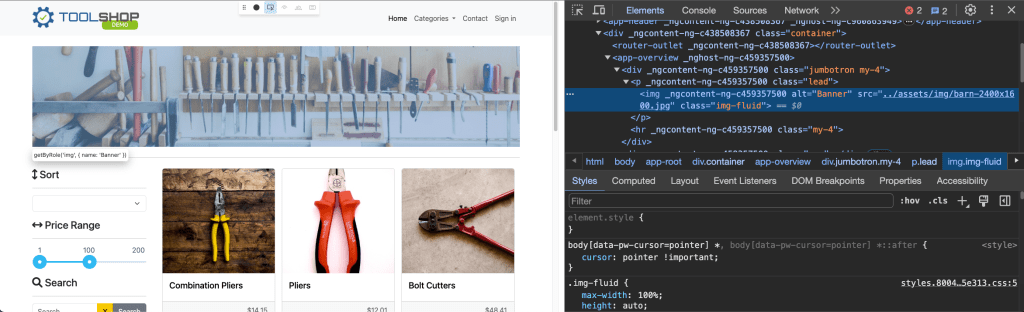
    2. Elements in HTML have attributes; these are additional values that configure the elements or adjust their behavior in various ways to meet the criteria the users want. Sometimes these attributes can have a value and sometimes doesn’t. Refer to Developer Mozilla Website for more information.”Class” and “id” are the most used attributes in HTML. (image: show class attribute, class value)
    3. Value in between angle braces is a plain text
    4. HTML tags usually come in pairs of Opening and Closing Tags.

    Locator Syntax Rules

    Locate Element by tag name:

    page.locator('img');

    Locate by id:

    page.locator('.img-fluid');

    Locate by class value:

    page.locator('.img-fluid');

    Locate by attribute:

    page.locator('[data-test="nav-home"]');

    Combine several selectors:

    page.locator('img.img-fluid');

    Locate by full class value:

    page.locator('[class=collapse d-md-block col-md-3 mb-3]');

    Locate by partial text match:

    page.locator(':text("Combination")');

    Locate by exact text match:

    page.locator(':text-is("Combination Pliers")');

    XPATH:

    As for XPath: it is not recommended approach to locate elements according to Playwright Best Practices:

    Source: https://playwright.dev/docs/other-locators#xpath-locator

    User-facing Locators.

    There are other ways to locate elements by using built-in APIs Playwright provides.

    There is one best practice we have to keep in mind: automated tests must focus on verifying that the application code functions as intended for end users, while avoiding reliance on implementation specifics that are not typically visible, accessible, or known to users. Users will only see or interact with the rendered output on the page; therefore, tests should primarily interact with this same rendered output. Playwright documentation: https://playwright.dev/docs/best-practices#test-user-visible-behavior.

    There are recommended built-in locators:

    1. page.getByRole() to locate by explicit and implicit accessibility attributes.
    2. page.getByText() to locate by text content.
    3. page.getByLabel() to locate a form control by associated label’s text.
    4. page.getByPlaceholder() to locate an input by placeholder.
    5. page.getByAltText() to locate an element, usually image, by its text alternative.
    6. page.getByTitle() to locate an element by its title attribute.
    7. page.getByTestId() to locate an element based on its data-testid attribute (other attributes can be configured).

    Let’s check out the example:

    test('User facing locators', async({page}) => {
    await page.getByPlaceholder('Search').click();
    await page.getByPlaceholder('Search').fill("Hand Tools");
    await page.getByRole('button', {name: "Search"}).click();
    await expect (page.getByRole('heading', {name: "Searched for: Hand Tools"})).toBeVisible();
    })

    where we would like to explore search functional test:

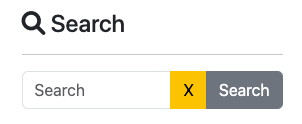
    Part of the page to be tested
    1. click on the Search Placeholder
    Search placeholder HTML

    await page.getByPlaceholder('Search').click();

    2. enter “Hand Tools” text to search for available items.

    await page.getByPlaceholder('Search').fill("Hand Tools");

    3. locate Search button and click it to confirm.

    Search button HTML

    4. Then we have to verify if no items have been found by asserting text on this page:

    Result after clicking on Search button
    No Result Found HTML

    await expect (page.getByRole('heading', {name: "Searched for: Hand Tools"})).toBeVisible();

    5. Run this test case and make sure test is passing.

    Assertions

    Playwright incorporates test assertions utilizing the expect function. To perform an assertion, utilize expect(value) and select a matcher that best represents the expectation. Various generic matchers such as toEqual, toContain, and toBeTruthy are available to assert various conditions.

    General Assertions

    // Using toEqual matcher
    test('Adding numbers', async () => {
    const result = 10 + 5;
    expect(result).toEqual(15);
    });

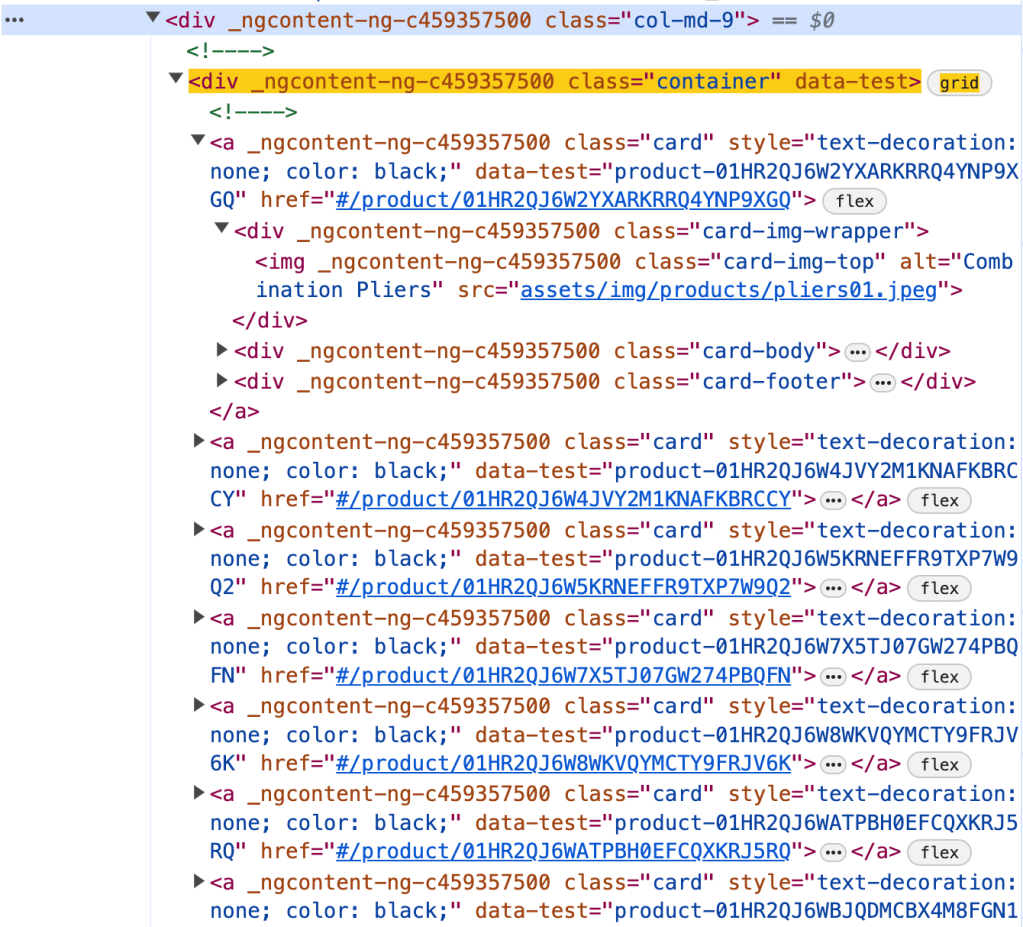
    Assert that the title of the product is “Combination Pliers”.

    Element on the page
    Element HTML
    const element = page.locator('.col-md-9 .container').first().locator('.card-title');
    const text = element.textContent();
    expect(text).toEqual('Combination Pliers');

    Locator Assertions

    Playwright provides asynchronous matchers, ensuring they wait until the expected condition is fulfilled. For instance, in the following scenario:

    const element = page.locator('.col-md-9 .container').first().locator('.card-title');
    await expect(element).toHaveText('Combination Pliers');

    !Note: do not forget to use await when asserting locators

    Playwright continuously checks the element with the test id of “status” until it contains the text “Combination Pliers”. This process involves repeated fetching and verification of the element until either the condition is satisfied or the timeout limit is reached. You have the option to either specify a custom timeout or configure it globally using the testConfig.expect value in the test configuration.

    By default, the timeout duration for assertions is set to 5 seconds.

    There are two types assertion though: Auto-Retrying Assertions and Non-Retrying Assertions.

    Auto-Retrying assertions provided below will automatically retry until they pass successfully or until the assertion timeout is exceeded. It’s important to note that these retrying assertions operate asynchronously, necessitating the use of the await keyword before them.

    Non-Retrying assertions enable testing various conditions but do not automatically retry.

    It’s advisable to prioritize auto-retrying assertions whenever feasible.

    Soft Assertions

    As a default behavior, when an assertion fails, it terminates the test execution. However, Playwright offers support for soft assertions. In soft assertions, failure doesn’t immediately stop the test execution; instead, it marks the test as failed while allowing further execution.

    For example, if we take the previous example and put .soft it assertion, in case assertion fails, it will not lead to termination of test execution.

    const element = page.locator('.col-md-9 .container').first().locator('.card-title');
    await expect.soft(element).toHaveText('Combination Pliers');

    Conclusion.

    In conclusion, we’ve explored the aspects of writing test cases using Playwright. We delved into the standard structure of a test case, incorporating essential elements such as hooks and grouping for efficient test management. Additionally, we examined various strategies for locating elements within web pages. Lastly, we discussed the importance of assertions in verifying expected behaviors, covering different assertion techniques to ensure robust and reliable testing. Examples of code, you can see in repository.

  • Part2: Have your test cases been suffering from ‘Flakiness’?

    Part2: Have your test cases been suffering from ‘Flakiness’?

    This is the second part of a series on Playwright using Typescript and today we are going to talk about challenges in UI Test Framework and explore how leveraging Playwright Best Practices can help us overcome them.

    End-to-end test cases have unique challenges due to their complex nature, as they involve testing the entire application user flow from start to finish. These tests often require coordination between different systems and components, making them non-sensitive to environmental inconsistencies and complex dependencies.

    What are other challenges we might encounter while working with UI Test Frameworks?

    1. Test cases can be slow to execute, as they often involve the entire application stack, including backend, frontend, database.
    2. End-to-End tests can be fragile, as they vulnerable to breaking whenever there is a change in DOM, even if the functionality stays the same.
    3. UI Tests consume more resources compared to other types of testing, requiring robust infrastructure to run efficiently.
    4. This type of test cases suffering from flakiness. Oh, yes, did I say flakiness? It could be a very annoying problem.

    Flaky tests pose a risk to the integrity of the testing process and the product. I would refer to great resource where The Domino Effect of Flaky Tests described.

    Main idea: while a single test with a flaky failure rate of 0.05% may seem insignificant, the challenge becomes apparent when dealing with numerous tests. An insightful article highlights this issue by demonstrating that a test suite of 100 tests, each with a 0.05% flaky failure rate, yields an overall success rate of 95.12%. However, in larger-scale applications with thousands of tests, this success rate diminishes significantly. For instance, with 1,000 flaky tests, the success rate drops to a concerning 60.64%. And seems, this problem is real and we have to handle it otherwise it will be “expensive” and annoying for test execution for a large-scale applications.

    Remember: Most of the time, flakiness is not the outcome of a bad test framework. Instead, it is the result of how you design the test framework and whether you follow its best practices.

    By following best practices and designing your tests carefully, you can prevent many flaky tests from appearing in the first place. That’s why before diving right into the implementation, let’s take a look at best practices for Playwright framework.

    1. Locate Elements on the page:

    • 👉 Use locators! Playwright provides a whole set of built-in locators. It comes with auto waiting and retry-ability. Auto waiting means that Playwright performs a range of actionability checks on the elements, such as ensuring the element is visible and enabled before it performs the click.
    await page.getByLabel('User Name').fill('John');

    await page.getByLabel('Password').fill('secret-password');

    await page.getByRole('button', { name: 'Sign in' }).click();

    await expect(page.getByText('Welcome, John!')).toBeVisible();
    • 👉 Prefer user-facing attributes over XPath or CSS selectors when selecting elements. The DOM structure of a web page can easily change, which can lead to failing tests if your locators depend on specific CSS classes or XPath expressions. Instead, use locators that are resilient to changes in the DOM, such as those based on role or text.
    • 🚫 Example of locator which could lead to flakiness in the future: page.locator('button.buttonIcon.episode-actions-later');
    • ✅ Example of robust locator, which is resilient to DOM change: page.getByRole('button', { name: 'submit' });
    • 👉 Make use of built-in codegen tool. Playwright has a test generator, which can generate locators and code for you. By leveraging this tool, you might get the most optimised locator. There is more information on codegen tool and capability to generate locators using VS Code Extension in the introductory article I wrote before.
    • 👉 Playwright has an amazing feature of auto-waiting. You can leverage this feature in web-first assertions. In this case, Playwright will wait until the expected condition is met. Consider this example: await expect(page.getByTestId('status')).toHaveText('Submitted'); . Playwright will be re-testing the element with the test id of status until the fetched element has the "Submitted" text. It will re-fetch the element and check it over and over, until the condition is met or until the timeout is reached. By default, the timeout for assertions is set to 5 seconds.
    • 🤖 The following assertions will retry until the assertion passes, or the assertion timeout is reached. Note that retrying assertions are async, so you must await them: https://playwright.dev/docs/test-assertions#auto-retrying-assertions
    • 🤖 Though you have to be careful, since not every assertion has auto-wait feature, please find them in the link by following this link: https://playwright.dev/docs/test-assertions#non-retrying-assertions.
    • ✅ Prefer auto-retrying assertions whenever possible.

    2. Design test cases thoughtfully:

    • 👉 Make tests isolated. Each test should be completely isolated, not rely on other tests. This approach improves maintainability, allows parallel execution and make debugging easier.
    • To avoid repetition, you might consider using before and after hooks. More ways of achieving isolation in Playwright, you can find by following this link: https://playwright.dev/docs/browser-contexts
    • Examples:
    • 🚫 Not Isolated test case which assumes that the first test case should always pass and it will be a precondition for the next one (in this case, in the first test case user is logging in, and then test case has been reused in the next one. What if the first test case has been failed?
    test('Login', async () => {
    // Login
    await login(username, password);

    // Verify Logged In
    await verifyLoggedIn();
    });

    test('Create Post', async () => {
    // Assuming already logged in for this test
    // Create Post
    await createPost(title, content);

    // Verify Post Created
    await verifyPost(title, content);
    });
    • ✅ In order to make test cases isolated, before and after hooks come handy to set up preconditions for the second test case.
    describe('Test Login', () => {

    // Login
    await login(username, password);

    // Verify Logged In
    await verifyLoggedIn();

    });

    describe('Post Management', () => {

    beforeEach(async () => {
    await login(username, password);
    });

    test('Create Post', async () => {
    // Create Post
    await createPost(title, content);

    // Verify Post Created
    await verifyPost(title, content);
    });

    // more test cases could be added
    });
    • 👉 Keep test cases small and avoid million assertions in one test case. Make sure, that one test case has one reason for test failure. You will thank yourself later for that.
    • 👉 Make sure you handle data correctly in the test case. Ensure that each test case is independent and does not rely on the state of previous tests. Initialize or reset the test data as needed before each test to prevent data dependency issues. When testing functionalities that interact with external services or APIs, consider using mock data or stubs to simulate responses.

    How to combat flaky tests?

    • 👉 Use debugging capabilities of Playwright tool. Run test cases with the flag --debug. This will run tests one by one, and open the inspector and a browser window for each test. it will display a debug inspector and give you insights on what the browser actually did in every step. 
    • 👉 Playwright supports verbose logging with the DEBUG environment variable: DEBUG=pw:api npx playwright test. In one of my articles, I also explain how to enable this mode from VSCode Extension.
    • 👉 Playwright provides a tracing feature that allows you to capture a detailed log of all the actions and events taking place within the browser. With tracing enabled, you can closely monitor network requests, page loads, and code execution. This feature is helpful for debugging and performance optimization.
    • To record a trace during development mode set the --trace flag to on when running your tests: npx playwright test --trace on
    • You can then open the HTML report and click on the trace icon to open the trace: npx playwright show-report.
    • 👉 You might want to slow down test execution by test.slow() to see more details. Slow test will be given triple the default timeout.
    • Example:
    import { test, expect } from '@playwright/test';

    test('slow test', async ({ page }) => {
    test.slow();
    // ...
    });

    Conclusion

    In conclusion, as you start working with new test automation tool, it’s vital to dive into best practices and familiarize yourself with the tool’s capabilities. Remember, flakiness isn’t solely the fault of the test tool itself; more often than not, it comes from how you utilize and implement it.

    Summing up best practices for Playwright:

    1. Utilize Locators and prioritize user-facing attributes.
    2. Ensure test isolation.
    3. Leverage built-in code generation functionalities.
    4. Make debugging your ally

  • Part1: Getting Started with Playwright using Typescript.

    Part1: Getting Started with Playwright using Typescript.

    Introduction

    This article will be part of a series focusing on the Playwright framework implemented with Typescript.

    Playwright is a modern web testing framework that is primarily used for testing web applications. It was developed by Microsoft and released in 2019. Playwright provides a set of APIs that allow developers to automate interactions with web pages, such as clicking buttons, filling out forms, and navigating through pages. It supports multiple programming languages including JavaScript, Python, and C#, making it accessible to a wide range of developers.

    Key Features:

    1. Playwright supports cross-browser test execution including Chromium, WebKit, and Firefox
    2. It is designed to work on various operating systems including Windows, Linux, MacOS
    3. Playwright offers a rich set of APIs for automating interactions with web pages. Developers can simulate user actions such as clicking, typing, hovering, and navigating through pages.
    4. Playwright includes built-in mechanisms for waiting for specific conditions to be met before executing further actions. This helps handle asynchronous behavior in web applications more effectively.
    5. Playwright provides parallel execution option out the box that can significantly reduce the overall execution time, especially for large test suites.
    6. It provides codegen capability to generate test steps and assertions.

    Moreover, Playwright uses unique approach for browser automation. Instead of launching a full new browser instance for each test case, Playwright launches one browser instance for entire suite of tests. It then creates a unique browser context from that instance for each test. A browser context is essentially like an incognito session: it has its own session storage and tabs that are not shared with any other context. Browser contexts are very fast to create and destroy. Then, each browser context can have one or more pages. All Playwright interactions happen through a page, like clicks and scrapes. Most tests only ever need one page.

    Setup the project

    Get started by installing Playwright using npm: npm init playwright@latest.

    Run the install command and select the following to get started:

    1. Choose between TypeScript or JavaScript (we are going to use TypeScript for this project)
    2. Name of your Tests folder (tests)
    3. Add a GitHub Actions workflow to easily run tests on CI (false)
    4. Install Playwright browsers (true)

    What is installed:

    playwright.config.ts
    package.json
    package-lock.json
    tests/
      example.spec.ts
    tests-examples/
      demo-todo-app.spec.ts
    

    This command will create a bunch of new project files, including:

    1. package.json file with the Playwright package dependency
    2. playwright.config.ts file with test configurations
    3. tests directory with basic example tests
    4. tests-examples directory with more extensive example tests

    Running Tests using command line.

    npx playwright test – run test cases in headless mode. In this case browser will not appear, all projects will be executed. On the screenshot below you can see that 4 test cases have been executed, all of them are passed, 2 workers have been used. Number of workers is configurable parameter in the playwright config.

    Playwright has built-in reporter. To see full report you can run npx playwright show-report command in the terminal.

    You can see test results, test duration, filter them by category “passed”, “failed”, “flaky”, “skipped”. All test cases marked with the name of project (in our case this is a name of the browser we are running test against). Moreover, you can expand and check test steps and traces (if available).

    If you want to run against one particular browser, run: npx playwright test --project=chromium.Test cases will be executed in headless mode.

    Headed mode: npx playwright test --project=chromium --headed

    In order to execute only one test spec add the name of the test spec: npx playwright test <name-of-the-test-spec> --project=chromium

    If you’d like to execute only one specific test case: npx playwright test -g <name-of-the-test-case> --project=chromium

    To skip test case add test.skip in test case file, like:

    import { test, expect } from '@playwright/test';

    test.skip('has title', async ({ page }) => {
    await page.goto('https://playwright.dev/');

    // Expect a title "to contain" a substring.
    await expect(page).toHaveTitle(/Playwright/);
    });

    test('get started link', async ({ page }) => {
    await page.goto('https://playwright.dev/');

    // Click the get started link.
    await page.getByRole('link', { name: 'Get started' }).click();

    // Expects page to have a heading with the name of Installation.
    await expect(page.getByRole('heading', { name: 'Installation' })).toBeVisible();
    });

    Result after test execution:

    Report shows that two test cases are skipped as intended:

    While test development you might need to run only one test. In this case use test.only.

    Test execution in UI mode.

    One of its most helpful features is UI mode, which visually shows and executes tests.

    To open UI mode, run the following command in your terminal: npx playwright test --ui

    Once you launch UI Mode you will see a list of all your test files. You can run all your tests by clicking the triangle icon in the sidebar. You can also run a single test file, a block of tests or a single test by hovering over the name and clicking on the triangle next to it.

    In the middle you will see a step-by-step trace of the test execution, together with screenshots of each step. It is also important to mention that you can debug test case here by checking “before” and “after” view, code source, logs and errors. One flaw of this mode is that the browser is not a browser itself, technically this is simply screenshot. That’s why it is more convenient to use it in combination with Playwright Extension (in VSCode).

    Test Execution with Playwright Extension.

    Install Extension by navigating to Preferences -> Extensions. Search for official extension called Playwright Test for VSCode, hit Install button. Once it’s been installed, navigate to Testing section on the left panel. List of test cases should be loaded.

    Before running test cases, you might want to provide specific settings by enabling/disabling headed execution, choosing target project, enabling / disabling trace generation. It is also possible to leverage codegen capabilities by recording test case, picking locator.

    Important point for this type of execution, that after execution is completed, browser stays open and you can easily interact with elements on the page like in real browser.

    Make debugging your friend.

    Playwright provides a tracing feature that allows you to capture a detailed log of all the actions and events taking place within the browser. With tracing enabled, you can closely monitor network requests, page loads, and code execution. This feature is helpful for debugging and performance optimization.

    To record a trace during development mode set the --trace flag to on when running your tests: npx playwright test --trace on

    You can then open the HTML report and click on the trace icon to open the trace: npx playwright show-report

    At the first glance the report looks the same:

    But you can find more information inside when you open one of the test case information:

    Also, to open trace you can run this command from the terminal: npx playwright show-trace path/to/trace.zip

    To debug all tests run the test command with the --debug flag. This will run tests one by one, and open the inspector and a browser window for each test: npx playwright test --debug

    Generating Test Code

    Playwright provides a codegen feature that allows users to easily generate code for their browser automation scripts. The Codegen feature in Playwright captures user interactions with the webpage, such as clicks, fills, and navigation, and then translates these interactions into executable code. This makes it easier for developers to create and maintain browser automation scripts, as they can simply record their actions and generate code.

    To launch code generator, run: npx playwright codegen

    Try loading a web page and making interactions with it. You’ll see Playwright code generated in real time. Once recording is complete, you can copy the code and refine it into a test case.

    With the test generator you can record:

    1. Actions like click or fill by simply interacting with the page
    2. Assertions by clicking on one of the icons in the toolbar and then clicking on an element on the page to assert against. You can choose:
      • 'assert visibility' to assert that an element is visible
      • 'assert text' to assert that an element contains specific text
      • 'assert value' to assert that an element has a specific value

    Once you’ve done with changes, you can press the 'record' button to stop the recording and use the 'copy' button to copy the generated code to your editor.

    Conclusion.

    In this introductory article, we made a journey to creating a Playwright framework using Typescript. We delved into executing test cases, setting up the development environment, and installing necessary extensions. Additionally, we gained insights into debugging properly and speeding up development process through the utilization of the built-in codegen functionality.

    Resources.

    1. Official Documentation: https://playwright.dev/
    2. Repository with the framework: https://github.com/nora-weisser/playwright-typescript

  • Assist testing with AI capabilities.

    Assist testing with AI capabilities.

    Introduction

    Just a decade ago, leveraging the power of AI models required significant investments of time, resources, and expertise. Developing and deploying AI models necessitated extensive training and dedicated infrastructure, often requiring businesses to hire specialized experts for development and maintenance. This process was cumbersome and inaccessible to many businesses. However, with the latest advancements of Large Language Models (LLMs), the landscape has dramatically shifted. And now we are starting to benefit from what is commonly referred to as the “Democratization of AI.”

    Democratization of artificial intelligence means making AI available for all. In other words, open-source datasets and tools developed by companies like Microsoft and Google – which demand less knowledge of AI from the user – are made available so that anyone can build innovative AI software. This has led to the rise of ‘citizen data scientists’.

    The Ultimate Guide to Democratization in Artificial Intelligence

    Therefore, human resources personnel and support can leverage AI capabilities to compile comprehensive responses in a few minutes. While social media professionals can generate engaging announcements with help of a couple of simple prompts. Testing and development are not an exception. Testing, a critical aspect of product quality assurance, benefits immensely from AI-powered tools like GenAI. What sets GenAI apart is its ability to summarize, analyze, and generate information in a manner that enhances testing efficiency and effectiveness. Testers can leverage LLMs to accelerate testing procedures, conduct more thorough assessments, and ensure continuous improvement in product quality. 

    What are the Large Language Models?

    How can individuals with limited experience in building and utilizing AI best approach understanding its principles and practical applications? Luckily, there is a Computerphile video “AI Language Models & Transformers” explaining fundamental principles on how LLM works:

    In this video, Rob Miles illustrates the concept by using an example of typing on a smartphone keyboard. As you type, the keyboard suggests words based on the beginning of the sentence, updating its suggestions as you select options. This simple analogy mirrors how LLMs operate, by leveraging the probability to predict the next word based on extensive training on vast datasets. 

    If you’d like to learn more about LLM and how it’s been trained from nutshell, check out this article by Tim Lee, a journalist with a master’s degree in computer science, and Sean Trott, a cognitive scientist at the University of California, San Diego: Large language models, explained with a minimum of math and jargon

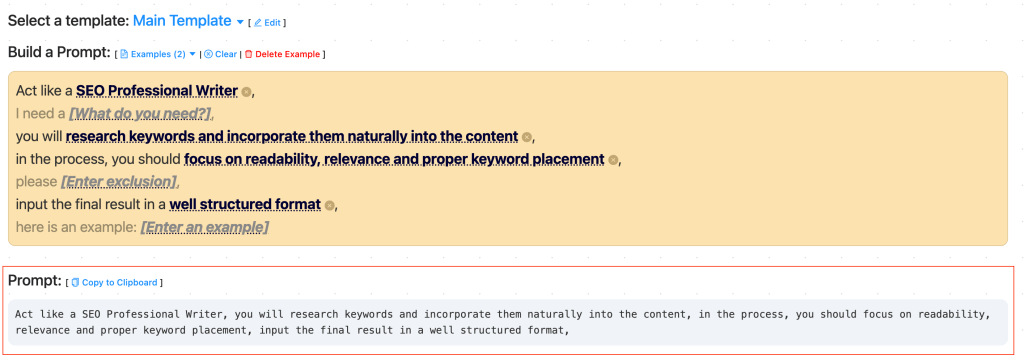
    Given that LLMs operate on probabilities, achieving the desired outcomes often requires adjusting our communication methods which may differ from normal human interaction. This is where prompt engineering comes into play. It contains a pile of pattern collections with the techniques used to execute against models. While I won’t delve deeply into this topic in this article, I do want to highlight a recent template developed by Dimitar Dimitrov. This resource, accessible at LLM Prompting, can be particularly valuable for beginners looking to construct prompts that extract optimal results.

    What LLMs can do?

    • Generative Capabilities

    Generative AI refers to the ability to produce original natural language output. Large Language Models (LLMs) advance at generating new content based on their models and provided prompts. However, it’s essential to understand that the generation process relies on probabilistic models. Additionally, LLMs may lack context and specificity regarding specific features or products. Therefore, providing adequate information and instructions for data output is crucial.

    • Transformation Capabilities

    Leveraging advanced algorithms, LLMs can efficiently convert data structures from one form to another. For example, they demonstrate proficiency in transitioning between tools such as Selenium to Cypress or Selenium to Playwright, as well as facilitating the conversion of code from Python to Javascript.

    • Enhancing Capabilities

    LLMs enable us to enhance and enrich existing information through various means. In April 2023 Similarweb, a market competition analysis company, reported that Stack Overflow’s traffic in the preceding month had dropped by 14%. CoPilot utilizes the same LLM model as ChatGPT, proficient in interpreting and generating human and programming languages. So, with a plugin integrated into VSCode developers can delegate the implementation of entire functions to CoPilot instead of searching for them on Stack Overflow. Source: Stack Overflow is ChatGPT Casualty: Traffic Down 14% in March.

    Moreover, ChatGPT becomes a thoughtful pairing with an advanced version of “rubber duck” starting from analyzing ideas, to analyzing code and solving problems related to code. 

    How can we leverage AI in testing?

    • Formulate test ideas

    Risk Identification and Test Idea Generation: Relying only on LLM-generated output to define testing decisions should be avoided. Instead, LLMs can serve as valuable tools for suggesting test ideas and identifying potential risks. These suggestions can then be used as starting points for further exploration or integrated into existing testing frameworks.

    Broadened Analysis: LLMs contribute to expanding analysis endeavors such as risk assessment and shift-left testing. By feeding them existing analysis data, LLMs can offer insights and suggest new ideas for incorporation into our analysis frameworks, enriching the overall assessment process.

    • Test Cases Implementation

    Code Snippets: While expecting LLMs to generate complete automated tests or frameworks may yield limited value, leveraging them to generate smaller components such as code snippets can be highly advantageous. These snippets can support testing activities like exploratory testing, enhancing efficiency and effectiveness.

    Code Conversion: LLMs advanced in converting functions, classes, and other code components into various iterations. Their value lies in their capacity to retain the logic and flow of the original code while translating it into different languages.

    Descriptive Annotations: Similar to code review, LLMs assist in enhancing code descriptiveness, enabling the rapid creation and maintenance of code comments. This proves invaluable in automated testing scenarios where clear communication of automation logic is vital for maintenance purposes.

    Examples:

    1. ZeroStep https://github.com/zerostep-ai/zerostep: makes it easier to write test cases with Playwright. 
    2. Postbot – AI-powered Postman Assistant: https://beththetester.wordpress.com/2023/06/12/5-ways-postmans-ai-postbot-can-help-your-testing/ 
    3. Visual testing with Applitools: https://applitools.com/ 
    4. CoPilot: https://copilot.microsoft.com/ 
    • Generate test data and prepare test environments

    Test Data Generation: LLMs, when equipped with explicit rules, can easily generate sets of data suitable for a variety of testing purposes.

    Data Transformation: Leveraging LLMs for data transformation improves testing processes significantly. For instance, LLMs can flawlessly convert plain-text test data into SQL statements or translate SQL statements into helper functions utilized in test automation.

    • Report Generation and Issues Reporting:

    Summarizing Notes: Although not a direct data conversion, LLMs can simultaneously transform and summarize information. They can extract raw testing notes from activities like exploratory or shift-left testing sessions and compile a summary for the development or management team. 

    • Test Maintenance:

    Automated Test Maintenance: AI-driven automation frameworks can monitor test execution results and automatically update test cases or scripts based on changes in application behavior or requirements. This helps ensure that tests remain relevant and effective as the software evolves over time.

    Examples:

    1. Testim.io: a cloud-based platform that empowers testers with efficient test case authoring, maintenance, and execution without the need for extensive coding expertise. It allows better test cases categorization. One of Testim.io’s most significant advantages is its embedded self-healing mechanism. 

    Numerous companies (including Google, Facebook and Microsoft) are already leveraging LLM to speed up and improve their automated testing procedures. I recently came across an article highlighting real-world examples that caught my attention: Enhancing Test Coverage with AI: Unleashing the Power of Automated Test Generation.

    Trust, but verify

    Russian Proverb

    While LLMs hold significant potential, it’s crucial not to blindly rely on their abilities. LLMs operate based on probabilities, which differ from human reasoning, underscoring the importance of skepticism in evaluating their outputs. Given the fact that LLM’s hallucination can be very convincing, blindly trusting LLMs can easily compromise the quality of testing. Thus, it’s essential to remember that humans, not LLMs, are ultimately responsible for problem-solving, critical thinking, and taking decisions effortlessly. 

    AI + Humans

    And in conclusion, in one of the latest episodes of TestGuild featuring Tariq King, Chief Executive Officer and Head of Test IO, a profound insight was shared:

    Tariq emphasized the importance of bringing humans in the loop to ensure AI systems remain aligned with their intended objectives, thereby preventing potential harm and mitigating bias.

    “AI should be something that we see as good, it helps us grow, it helps us automate and become more efficient and so on and so forth. The only way that you can actually make sure that AI serves that purpose for humans is to have humans in the loop throughout the process. Meaning, humans involved in AI development, whether it could be curation test data, whether that be mitigating unwanted bias .. You need humans in the loop to review and make sure that these systems are not deviating away from something that would be very useful into something that’s either not useful or even potentially harmful.”

    • Tariq King, Chief Executive Officer and Head of Test IO

    Resources:

    1. AI-Assisted Testing by Mark Winteringham https://www.manning.com/books/ai-assisted-testing
    2. GenAI for Testers Course: https://www.thetesttribe.com/courses/generative-ai-software-testing/
    3. Prompt Engineering Guide: https://www.promptingguide.ai/
    4. ChatGPT Prompt Engineering for Developers: https://www.deeplearning.ai/short-courses/chatgpt-prompt-engineering-for-developers/
  • Part 2. How to approach API testing?

    Part 2. How to approach API testing?

    🤨 What is API Testing?

    API testing is important for validating the functionality of the API and ensuring that it meets the functional requirements. It is critical for integration testing since APIs are used to communicate between different software systems. API testing helps to identify issues early in the development cycle and prevents costly bugs and errors in production. This process is designed to not only test the API’s functionality — but also its reliability, performance, and security.

    🧪 Why should you care about API Testing?

    You can find bugs earlier and save money

    Testing REST requests means you can find bugs earlier in the development process, sometimes even before the UI has been created!

    FACT:
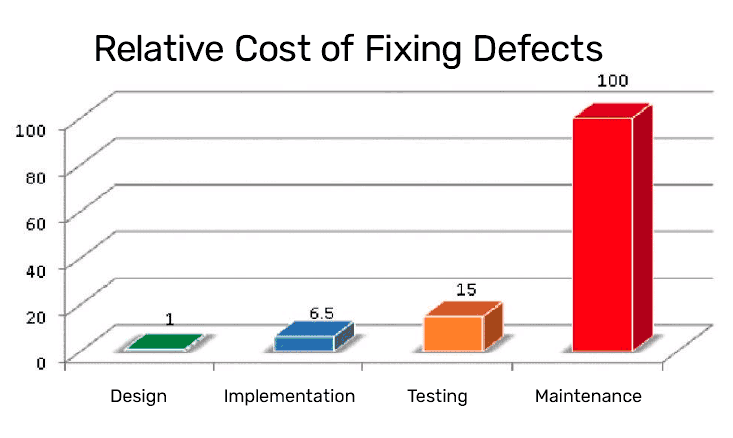
    According to the Systems Sciences Institute at IBM, the cost to fix a bug found during implementation is about six times higher than one identified during design. The cost to fix an error found after product release is then four to five times as much as one uncovered during design, and up to 100 times more than one identified during the maintenance phase. In other words, the cost of a bug grows exponentially as the software progresses through the SDLC.
    Relative Cost of Fixing Defects

    You can find flaws before they are exploited

    Malicious users know how to make REST request and can use them to exploit security flaws in your application by making requests the UI doesn’t allow; you’ll want to find and fix these flaws before they are exploited

    It is easy to automate

    Automation scripts run much faster than UI Automation

    ❌ Everything could go wrong!

    When working with API, there set of risks and potential bugs that you might avoid to ensure the reliability and security of the application (not limited list of risks):

    ⚠️ Risk#1. We could extract personal / private information without proper authentication. It could lead to unauthorized access problems and data breaches.

    🐞 Bugs: Missing or misconfigured authentication tokens, incorrect permission settings, or bypassing authorization checks.


    ⚠️ Risk#2. When a user sends wrong data in the wrong format, it could break the system with 500 errors.


    ⚠️ Risk#3. Improper input validation can lead to security vulnerabilities like SQL-injection cross-site scripting.

    🐞 Bugs: not validation request parameters, not handling unexpected data formats properly


    ⚠️ Risk#4. Insecure data transmission. Transmitting data using unencrypted channels could lead to exposing sensitive information or interception.

    🐞 Bugs: Not using HTTPS, ignoring SSL certification


    ⚠️ Risk#5. Poor error handling may lead to exposing sensitive information or make difficult diagnosing of issues

    🐞 Bugs: returning too details error messages which are revealing implementation details or which are not providing necessary information to the user


    ⚠️ Risk#6. Performance issues. API doesn’t handle loads efficiently which can lead to performance degradation or outages.

    🐞 Bugs: memory leaks, inefficient database queries, not optimized API response times.


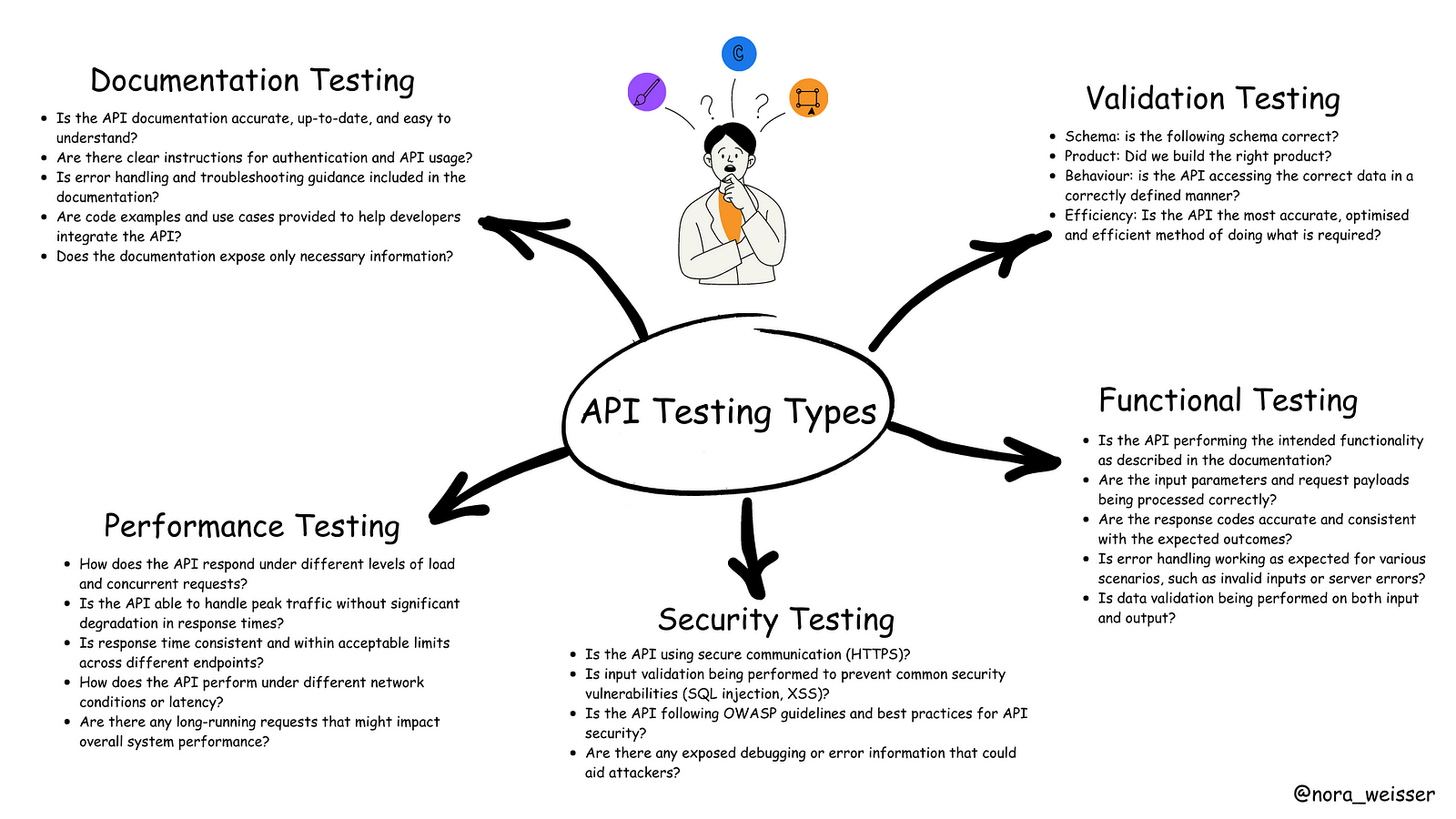
    This schema illustrates the types of questions that a tester can pose to ensure comprehensive API testing. This list is not limited.

    Questions that a tester can pose to ensure comprehensive API testing

    💡 Let’s take a look at the API Testing in more detail

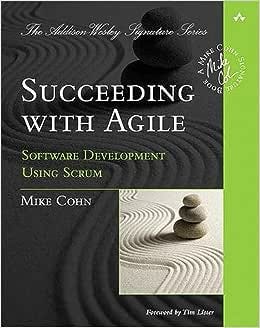
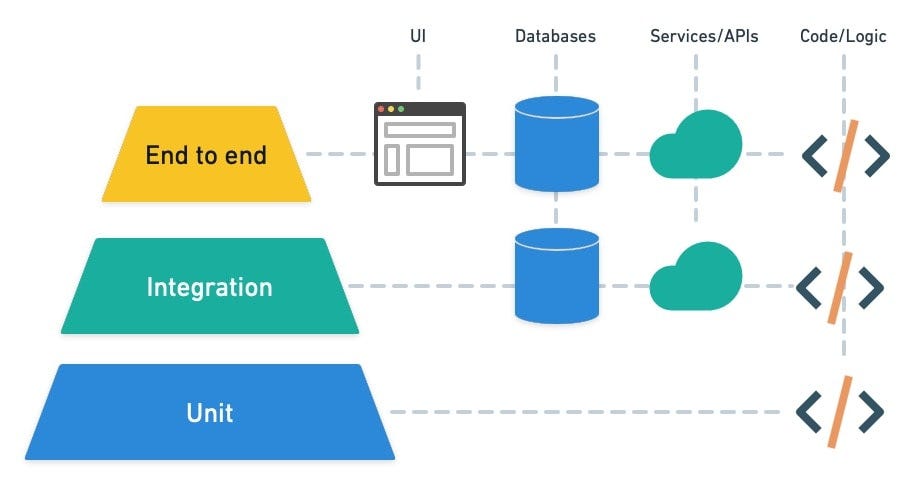
    Introduced by Mike Cohn in his book Succeeding with Agile (2009), the pyramid is a metaphor for thinking about testing in software.

    The testing pyramid is a concept in software testing that represents the ideal distribution of different types of tests in a software development process.

    Source: https://semaphoreci.com/blog/testing-pyramid

    It emphasises having a larger number of lower-level tests and a smaller number of higher-level tests. The testing pyramid is a way to ensure a balanced and effective testing strategy.

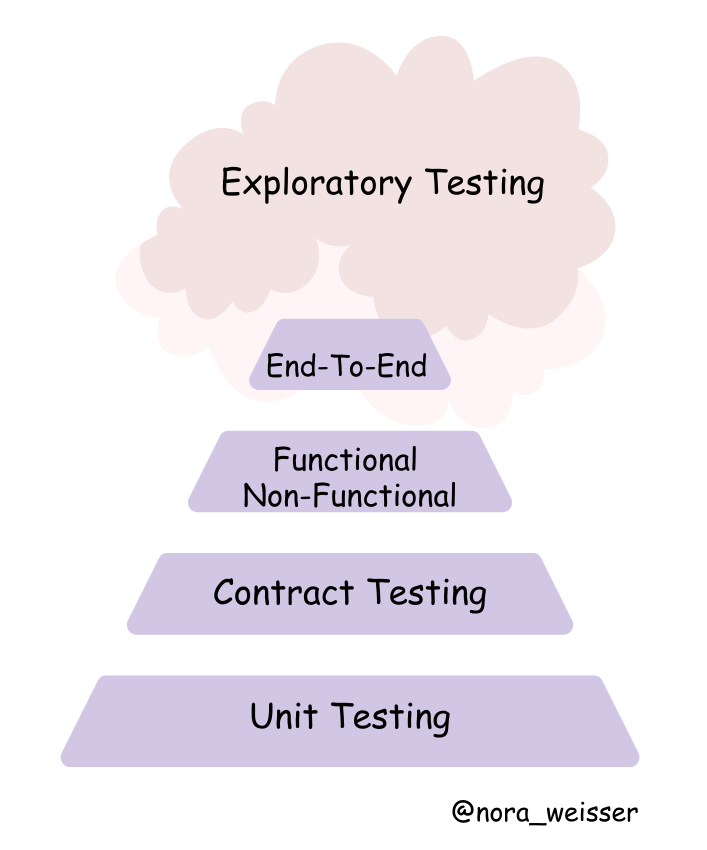
    I adjusted this pyramid to API Testing and what I’ve got:

    API Testing Pyramid

    Unit Testing

    Unit tests, unit tests and unit tests once more. Everybody knows the benefits of unit tests: we should be able to identify any problems with the current components of APIs as soon as possible. The higher unit tests coverage, the better for you and your product.

    Contract Testing

    Assert that the specs have not changed. This type of testing is used to test the contracts or agreements established between various software modules, components, or services that communicate with each other via APIs. These contracts specify the expected inputs, outputs, data formats, error handling, and behaviours of the APIs.

    JSON-schema is a contract that defines the expected data, types and formats of each field in the response and is used to verify the response.

    Example of JSON Schema

    Official Documentation: https://json-schema.org/

    Functional Testing

    The purpose of functional testing is to ensure that you can send a request and get back the anticipated response along with status. That includes positive and negative testing. Make sure to cover all of the possible data combinations.

    Test Scenario categories:

    • – Happy Path (Positive test cases) checks basic information and if the main functionality met
    • – Positive test cases with optional parameters. With these test cases it is possible to extend positive test cases and include more extra checks
    • – Negative cases. Here we expect the application to gracefully handle problem scenarios with both valid user input (for example, trying to add an existing username) and invalid user input (trying to add a username which is null)
    • – Authorization, permission tests

    How to start with Functional Testing?

    1. Read API documentation / specification / requirements carefully to understand its endpoints, request methods, authentication methods, status codes and expected responses.
    2. Based on the functionality you are going to test, outline positive and negative test scenarios which cover use cases and some edge cases as well. Revisit Functional API Testing section for more details.
    3. Setup test environment: create a dedicated test environment that mirrors the production environment.
    4. Select an appropriate tool (for example, Postman, Insomnia), frameworks (for example, pytest, JUnit, Mocha), technologies, programming languages (Python, Javascript, Java, etc.) with appropriate libraries for API Testing.
    5. Plan Test Data: It is always important to populate the environment with the appropriate data.
    6. Write Automation scripts: Automate repetitive test cases, like smoke, regression suites to ensure efficient and consistent testing. Validate responses against expected outcomes and assertions, checking for proper status codes, headers, and data content.
    7. Test the API’s error-handling mechanisms: Verify that the API responds appropriately with clear error messages and correct status codes.
    8. Document Test Results: Maintain detailed documentation of test cases, expected outcomes, actual results to make onboarding of new team members easier.
    9. Collaborate with developers: it is important to have consistent catch-ups with your team and stakeholders to review test results and address any identified issues.
    10. Continuous Improvement: Continuously refine and improve your testing process based on lessons learned from previous test cycles.
    11. Feedback Loop: Provide feedback to the development team regarding the API’s usability, performance, and any issues encountered during testing.

    Non-Functional

    Non-functional API testing is where the testers check the non-functional aspects of an application, like its performance, security, usability, and reliability. Simply put, the functional test focuses on whether API works, whereas non-functional tests focus on how well API works.

    End-to-end testing

    In general, end-to-end testing is the process of testing a piece of software from start to finish. We are checking it by mimicking user actions. If it comes to API, it is crucial to check if APIs can communicate properly by making call like a real client.

    Exploratory testing

    Source: Google Images

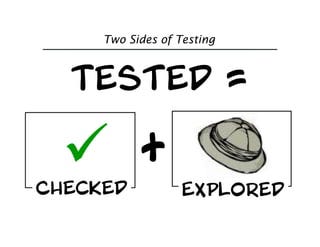
    You’re not done testing until you’ve checked that the software meets expectations and you’ve explored whether there are additional risks. A comprehensive test strategy incorporates both approaches.

    Elisabeth Hendrickson, book “Explore It!”

    When all automation and scripted testing is performed, it is time to examine an API, interact and observe its behavior. This is a great way to learn and explore edge cases to uncover issues that automated or scripted testing would have missed.

    There are two ways of doing it:

    1. When test engineer performs it individually, He/She needs to apply domain knowledge intuition, critical thinking and user-centric thinking.
    2. There is another way — pair testing which involves two people: driver and navigator. It is a time-boxed testing when the driver performs the actual testing while the navigator observes, provides guidance, and takes notes where necessary. This approach maximizes a level of creativity and encourages knowledge sharing and better collaboration between team members.

    More information: https://www.agileconnection.com/article/two-sides-software-testing-checking-and-exploring

    Book “Explore It!”: https://learning.oreilly.com/library/view/explore-it/9781941222584/

    BONUS:

    Health Check API: transition to the cloud and refactoring of the applications to microservices introduced new challenges in effective monitoring these microservices at scale. To standardise the process of validating the status of a service and its dependencies, it becomes helpful to introduce a health check API endpoint to a RESTful (micro) service. As part of the returned service status, a health check API can also include performance information, such as component execution times or downstream service connection times. Depending on the state of the dependencies, an appropriate HTTP return code and JSON object are returned.

    🎬 Conclusion

    In conclusion, mastering the art of API testing requires a good approach that includes strategic planning, and continuous improvement.

    Remember, API testing is not a one-time effort, but an ongoing process that evolves alongside your software development lifecycle. Continuous improvement is key to refining your API testing strategy. Regularly review and update your test cases, incorporating changes due to new features, bug fixes, or code refactoring. Learn from exploratory testing output, identify areas of improvement by listening to your customer’s and team’s feedback.

  • Part 1: API explained

    Part 1: API explained

    This is the first part of series about API Testing. I am going to start with general concepts, I will talk about fundamental concept of APIs, tracing their historical roots, exploring various types of protocols they employ, and understanding the essential components that constitute an API.

    A Historical Perspective

    Back in the 1950s, an API was understood as a potential method to facilitate communication between two computers. This term was first mentioned in a 1951 book written by Maurice Wilkes and David Wheeler called ‘The Preparation of Programs for an Electronic Digital Computer’. It outlined several key computing terms, including the first API. At this stage, an API was starting to exist, but they were limited to simple, command-line interfaces that enabled programmers to interact with computers.

    The Preparation of Programs for an Electronic Digital Computer, Maurice Wilkes and David Wheeler

    Blog: https://blog.postman.com/intro-to-apis-history-of-apis/

    What is API?

    API is an Application Programming Interface. API is a set of routines, protocols and tools for building Software Application.

    How API evolved throughout the time?

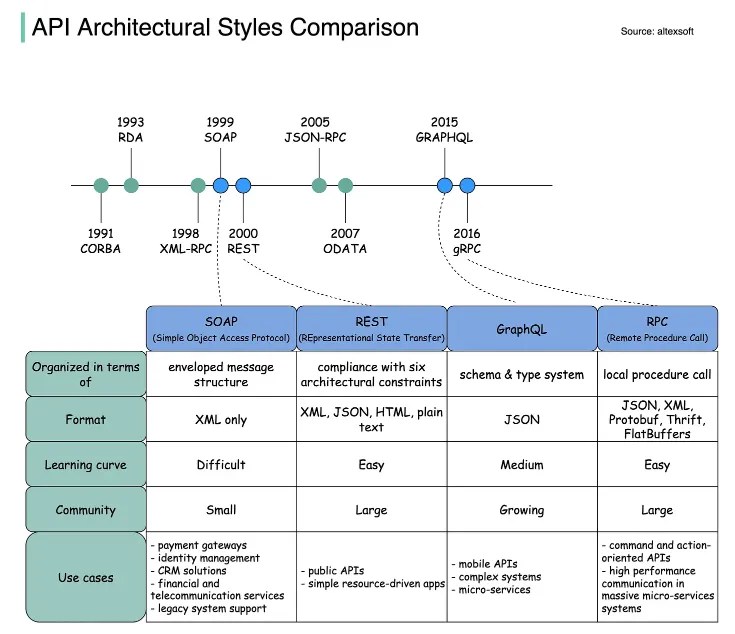
    The diagram illustrates the API timeline and API styles comparison. Source: https://blog.bytebytego.com/p/soap-vs-rest-vs-graphql-vs-rpc

    Throughout the time the internet has changed and evolved, applications and APIs evolved along with it. Many years ago APIs were built with strict rules to allow the two sides of the interface talking to each other. Over time, different API protocols have been released, each of them has its own pattern of standardizing data exchange.

    1. SOAP is an XML-formatted, highly standardized web communication protocol. Released by Microsoft in the 1990s. XML data format drags behind a lot of formality. Paired with the massive message structure, it makes SOAP the most verbose API style.
    2. In the early 2000s, the web started to shift towards a more consumer-based place. Some e-commerce sites, such as eBay and Amazon, started using APIs, which are more public and flexible. Twitter, Facebook and others joined them as well in using REST APIs. This API style was originally described in 2000 by Roy Fielding in his doctoral dissertation. REST is the Representational State Transfer Protocol. REST makes server-side data available representing it in simple formats, often JSON. It is the most commonly used protocol nowadays.
    3. The internet continued to change, mobile applications were becoming popular. Companies faced challenges with the amount of data they wanted to transfer on mobile devices. So, Facebook created GraphQL. This query language helps to reduce the amount of data that gets transferred while introducing a slightly more rigid structure to the API.
    4. 4. gRPC was developed by Google for implementing distributed software systems that need to run fast on a massive scale. Initially, it was not standardized to be used as a generic framework as it was closely tied to Google’s internal infrastructure. In 2015 Google liberalized it as open source and standardized it for community use, under the name gRPC. During the first year of its launch, it was adopted by large companies such as Netflix, Docker or Cisco among others.

    REST API vs. SOAP vs. GraphQL vs. gRPC by Alex Xu: https://www.altexsoft.com/blog/soap-vs-rest-vs-graphql-vs-rpc/

    More about REST API: https://blog.bytebytego.com/p/the-foundation-of-rest-api-http

    What is RESTful API so popular: https://blog.bytebytego.com/p/why-is-restful-api-so-popular

    API in more detail

    The working principle of API is commonly expressed through the request-response communication between a client and a server. In a web API, a client is on one side of the interface and sends requests, while a server (or servers) is on the other side of the interface and responds to the request.

    Since the REST API is the most popular, we are going to talk about it in detail.

    These are the general steps for any REST API call:

    1. Client sends a request to the server. The client follows the API documentation to format the request in a way that the server understands.
    2. The server authenticates the client and confirms that the client has the right to make that request.
    3. The server receives the request and processes it internally.
    4. The server returns a response to the client. The response contains information that tells the client whether the request was successful. The response also includes any information that the client requested.

    1 — HTTP Methods

    Request methods are the actions that the client wants to perform on the server resource. The most common methods are GET, POST, PUT, DELETE, others are: UPDATE, HEAD, CONNECT, OPTIONS, TRACE, PATCH.

    • GET: retrieves the information from the server
    • POST: used to add a new object to the server resource.
    • PUT: used to update the existing object on the server resource.
    • DELETE: used to delete the object on the server resource.

    More information: https://developer.mozilla.org/en-US/docs/Web/HTTP/Methods

    2 — HTTP Headers

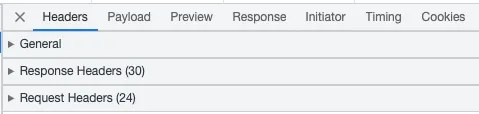
    HTTP headers play a crucial role in how clients and servers send and receive data. They provide a structured way for these entities to communicate important metadata about the request or response. This metadata can contain various information like the type of data being sent, its length, how it’s compressed, and more.

    Headers are logically grouped into three categories: request headers, response headers and general header. This can be seen in the network tab of the browser after sending the request.

    Request headers are:

    1. Authorization: request header can be used to provide credentials that authenticate a user agent with a server, allowing access to a protected resource.
    2. Host: this is the domain name of the server
    3. Accept-Language: request HTTP header indicates the natural language and locale that the client prefers.
    4. Accept-Encoding: request HTTP header indicates the content encoding (usually a compression algorithm) that the client can understand.
    5. Content-Type: this field tells the client the format of the data it’s receiving

    Response headers:

    1. Expires: this header contains the date/time after which the response is considered expired.
    2. Content-Length: this field in the request or response header plays a crucial role in data transfer. It specifically indicates the size of the body of the request or response in bytes. This helps the receiver understand when the current message ends and potentially prepare for the next one, especially in cases where multiple HTTP messages are being sent over the same connection.
    3. Content-Type: this field tells the client the format of the data it’s receiving
    4. Cache-Control: HTTP header field holds directives (instructions) — in both requests and responses — that control caching in browsers and shared caches (e.g. Proxies, CDNs)
    5. Date: HTTP header contains the date and time at which the message originated.
    6. Keep-Alive: general header allows the sender to hint about how the connection may be used to set a timeout and a maximum amount of request

    General Headers:

    1. Request URL
    2. Request Method
    3. Status Code
    4. Remote Address
    5. Connection

    More information: https://developer.mozilla.org/en-US/docs/Web/HTTP/Headers

    3 — Request/Response Payload

    Request Body has a format to be followed, which is understood by the server resource or the service endpoint. Usually the response body is in JSON.

    What is JSON?

    JSON (JavaScript Object Notation) is an open-standard file format or data interchange format that uses human-readable text to transmit data objects.

    A JSON object contains data in the form of a key/value pair. The keys are strings and the values are the JSON types. Keys and values are separated by a colon. Each entry (key/value pair) is separated by a comma. The { (curly brace) represents the JSON object. An example of JSON is provided below.

    {
    "First name": "John",
    "Age": 22,
    "isMaried": false,
    "Hobbies": [
    "Netflix",
    "mountain biking"
    ]
    }

    4 — URL

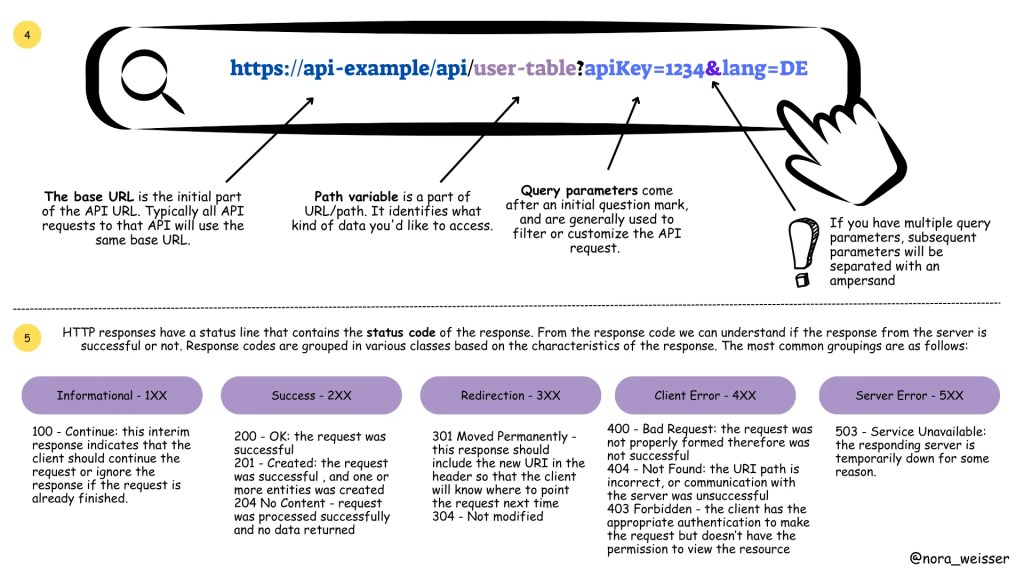
    A REST API is accessed with a URL. The URL consists of a base URL, resource, path variables and query parameters. The base URL is the internet host name for the REST API. Resources are presented as sets of endpoints grouped on the basis of related data or the object they allow working with.

    Difference between query parameters and path variables:

    The difference between path variables and query parameters

    5 — HTTP Status Codes

    The REST responses includes a status code that indicates whether the request was successful, and if not, the type of the error that occurred.

    Response codes are grouped in various classes based on the characteristics of the response. The most common groupings are as follows (with several examples)

    1. Informational — 1XX

    100 — Continue: this interim response indicates that the client should continue the request or ignore the response if the request is already finished.

    2. Success — 2XX

    200 — OK: the request was successful

    201 — Created: the request was successful , and one or more entities was created

    204 No Content — request was processed successfully and no data returned

    3. Redirection — 3XX

    301 Moved Permanently — this response should include the new URI in the header so that the client will know where to point the request next time

    304 — Not modified

    4. Client Error — 4XX

    400 — Bad Request: the request was not properly formed therefore was not successful

    404 — Not Found: the URI path is incorrect, or communication with the server was unsuccessful

    403 Forbidden — the client has the appropriate authentication to make the request but doesn’t have the permission to view the resource

    5. Server Error — 5XX

    503 — Service Unavailable: the responding server is temporarily down for some reason.

    More information: https://developer.mozilla.org/en-US/docs/Web/HTTP/Status

    Conclusion

    We began by diving into the fundamental concepts, grasping the essence of Application Programming Interfaces.

    Tracing their historical roots, we witnessed the evolutionary growth of APIs. From the early days of monolithic architectures to the rise of microservices, APIs have proven to be the backbone of seamless communication between various software components.

    Furthermore, we explored the diverse types of protocols employed by APIs, including REST, SOAP, GraphQL, and more. Each protocol brings its unique strengths, ensuring that developers have the flexibility to choose the most suitable option for their projects.

    Understanding the essential components of an API, such as endpoints, methods, headers, and payloads, has given us a deeper appreciation for the intricacies involved in API design and usage. These components act as the building blocks that facilitate data exchange, functionality integration, and ultimately, the seamless flow of information between different applications.

    In the upcoming parts of this series, we will take a look at the world of API Testing. We will explore the best practices for testing APIs, the tools and frameworks available, and various testing methodologies to ensure the robustness, security, and efficiency of APIs.