Introduction
In the previous article consumer-driven contract testing has been introduced. And at this point, I am sure you can’t wait to start actual implementation. So let’s not delay any further!
Let’s start with the implementation using Pact.
Based on official documentation, Pact is a code-first tool for testing HTTP and message integrations using contract tests.
As a system under test we are going to use consumer-provider applications written in JavaScript. You can find the source code in the GitHub Repository.
Consumer Tests
The focus of the consumer test is the way to check if the consumer’s expectations match what the provider does. These tests are not supposed to verify any functionality of the provider, instead focus solely on what the consumer requires and validate whether those expectations are met.
Loose Matchers
To avoid brittle and flaky tests, it is important to use loose matchers as a best practice. This makes contract tests more resilient to minor changes in the provider’s response. Generally, the exact value returned by the provider during verification is not critical, as long as the data types match (Pact documentation). However, an exception can be made when verifying a specific value in the response.
Pact provides several matchers that allow flexible contract testing by validating data types and structures instead of exact values. Key loose matchers can be found in the Pact documentation.
Example without loose matchers (strict matching):
describe("getBook", () => {
    test("returns a book when a valid book id is provided", async () => {

        await provider.addInteraction({
            states: [{ description: "A book with ID 1 exists" }],
            uponReceiving: "a request for book 1",
            withRequest: {
                method: "GET",
                path: "/books/1",
            },
            willRespondWith: {
                status: 200,
                headers: { "Content-Type": "application/json" },
                body: {
                    id: 1,
                    title: "To Kill a Mockingbird",
                    author: "Harper Lee",
                    isbn: "9780446310789"
                },
            },
        })

        await provider.executeTest(async (mockService) => {
            const client = new LibraryClient(mockService.url)
            const book = await client.getBook(1)
            expect(book).toEqual(expectedBook)
        })
    })
})
Problem: This test will fail if id, title, or author, isbn changes even slightly.
Example with loose matchers (flexible and maintainable):
Using Pact matchers, we allow the provider to return any valid values of the expected types:
describe("getBook", () => {
    test("returns a book when a valid book id is provided", async () => {
      const expectedBook = { id: 1, title: "To Kill a Mockingbird", author: "Harper Lee", isbn: "9780446310789" }

      await provider.addInteraction({
        states: [{ description: "A book with ID 1 exists" }],
        uponReceiving: "a request for book 1",
        withRequest: {
          method: "GET",
          path: "/books/1",
        },
        willRespondWith: {
          status: 200,
          headers: { "Content-Type": "application/json" },
          body: like(expectedBook),
        },
      })

      await provider.executeTest(async (mockService) => {
        const client = new LibraryClient(mockService.url)
        const book = await client.getBook(1)
        expect(book).toEqual(expectedBook)
      })
    })
  })
In this case the contract remains valid even if actual values change, validation focused only on ensuring that data types and formats are correct.
Steps to write consumer contract tests
Scenarios:
- Validate that
LibraryClient.getAllBooks()retrieves a list of books. - Validate that
LibraryClient.getBook(id)correctly fetches a single book when given a valid ID.
To start with hands-on, you have to clone the repository with the consumer and provider.
To start with consumer, open consumer.js file. Inside you can find the LibraryClient class represents the consumer in a consumer-driven contract testing setup. It acts as a client that interacts with an external Library API (provider) to fetch and manage book data.
There are a few functions present:
getBook(id)– Fetches a single book by its id. Returns the data in JSON format.getAllBooks()– Fetches all books from the API. Returns a list of books in JSON format.addBook(title, author, isbn)– Sends a POST request to add a new book. Returns the newly created book’s details.
Writing the first consumer contract test:
- Importing the required dependencies and Consumer Class.
const path = require('path');
const { PactV3, MatchersV3 } = require('@pact-foundation/pact');
const LibraryClient = require('../src/client');- Setting up the mock provider
const provider = new PactV3({
    dir: path.resolve(process.cwd(), 'pacts'),
    consumer: "LibraryConsumer",
    provider: "LibraryProvider"
})
The code above creates a Pact mock provider (provider) using PactV3 library where specifies:
LibraryConsumeras the name of the consumer (the client making requests).LibraryProvideras the name of the provider (the API responding to requests).- Passing parameter
dirto define directory for the contract to be stored.
- Setting up the interaction of the consumer and mock provider and register consumer expectations.
const EXPECTED_BOOK = { id: 1, title: "To Kill a Mockingbird", author: "Harper Lee", isbn: "9780446310789" }

describe("getAllBooks", () => {
    test("returns all books", async () => {

        provider
            .uponReceiving("a request for all books")
            .withRequest({
                method: "GET",
                path: "/books",
            })
            .willRespondWith({
                status: 200,
                body: MatchersV3.eachLike(EXPECTED_BOOK),
            })

        await provider.executeTest(async (mockService) => {
            const client = new LibraryClient(mockService.url)
            const books = await client.getAllBooks()
            expect(books[0]).toEqual(EXPECTED_BOOK)
        })
    })
})

describe("getBook", () => {
    test("returns a book when a valid book id is provided", async () => {

        provider
            .given('A book with ID 1 exists')
            .uponReceiving("a request for book 1")
            .withRequest({
                method: "GET",
                path: "/books/1",
            })
            .willRespondWith({
                status: 200,
                body: MatchersV3.like(EXPECTED_BOOK),
            }),

        await provider.executeTest(async mockProvider => {
            const libraryClient = new LibraryClient(mockProvider.url)
            const book = await libraryClient.getBook(1);
            expect(book).toEqual(EXPECTED_BOOK);
        })
    })
})- First we define the expected book. This object represents a single book that we expect the API to return. It acts as a template for what a book response should look like.
provider.addInteraction({...})sets up a mock interaction.
uponReceiving: Describes what the test expects.
withRequest: Defines the expected request details:
- Method:
GET - Endpoint:
/books
willRespondWith: Defines the expected response:
- Status Code: 200
- Body:
MatchersV3.eachLike(EXPECTED_BOOK) eachLike(EXPECTED_BOOK): Ensures the response contains an array of objects that match the structure ofEXPECTED_BOOK.
4. Calling the consumer against the mock provider:
        await provider.executeTest(async mockProvider => {
            const libraryClient = new LibraryClient(mockProvider.url)
            const book = await libraryClient.getBook(1);
            expect(book).toEqual(EXPECTED_BOOK);
        })
Now, you are ready to run the test! First, create a new script in our package.json file called test:consumer, which uses jest command followed by the test file you want to execute:
"test:consumer": "jest consumer/test/consumer.test.js",Save the changes and run tests by executing this command:
npm run test:consumerIf everything set up correctly you should get one test passing:

If the test passes, a contract is generated and saved in the pacts folder. If it fails, the contract cannot be created.
The content of the contract should include the information about the consumer, provider, interaction which have been set up, the request and response details expected from the provider, matching rules and any other relevant information.
{
  "consumer": {
    "name": "LibraryConsumer"
  },
  "interactions": [
    {
      "description": "a request for all books",
      "request": {
        "method": "GET",
        "path": "/books"
      },
      "response": {
        "body": [
          {
            "author": "Harper Lee",
            "id": 1,
            "isbn": "9780446310789",
            "title": "To Kill a Mockingbird"
          }
        ],
        "headers": {
          "Content-Type": "application/json"
        },
        "matchingRules": {
          "body": {
            "$": {
              "combine": "AND",
              "matchers": [
                {
                  "match": "type",
                  "min": 1
                }
              ]
            }
          }
        },
        "status": 200
      }
    },
    {
      "description": "a request for book 1",
      "providerStates": [
        {
          "name": "A book with ID 1 exists"
        }
      ],
      "request": {
        "method": "GET",
        "path": "/books/1"
      },
      "response": {
        "body": {
          "author": "Harper Lee",
          "id": 1,
          "isbn": "9780446310789",
          "title": "To Kill a Mockingbird"
        },
        "headers": {
          "Content-Type": "application/json"
        },
        "matchingRules": {
          "body": {
            "$": {
              "combine": "AND",
              "matchers": [
                {
                  "match": "type"
                }
              ]
            }
          }
        },
        "status": 200
      }
    }
  ],
  "metadata": {
    "pact-js": {
      "version": "11.0.2"
    },
    "pactRust": {
      "ffi": "0.4.0",
      "models": "1.0.4"
    },
    "pactSpecification": {
      "version": "3.0.0"
    }
  },
  "provider": {
    "name": "LibraryProvider"
  }
}
Provider tests
The primary goal of provider contract tests is to verify the contract generated by the consumer. Pact provides a framework to retrieve this contract and replay all registered consumer interactions to ensure compliance. The test is run against the real service.
Provider States
Before writing provider tests, I’d like to introduce another useful concept: provider states.
Following best practices, interactions should be verified in isolation, making it crucial to maintain context independently for each test case. Provider states allow you to set up data on the provider by injecting it directly into the data source before the interaction runs. This ensures the provider generates a response that aligns with the consumer’s expectations.
The provider state name is defined in the given clause of an interaction on the consumer side. This name is then used to locate the corresponding setup code in the provider, ensuring the correct data is in place.
Example
Consider the test case: “A book with ID 1 exists.”
To ensure the necessary data exists, we define a provider state inside stateHandlers, specifying the name from the consumer’s given clause:
            stateHandlers: {
                "A book with ID 1 exists": () => {
                    return Promise.resolve("Book with ID 1 exists")
                },
            },
On the consumer side, the provider state is referenced in the given clause:
        provider
            .given('A book with ID 1 exists')
            .uponReceiving("a request for book 1")
            .withRequest({
                method: "GET",
                path: "/books/1",
            })
            .willRespondWith({
                status: 200,
                body: MatchersV3.like(EXPECTED_BOOK),
            }),
This setup ensures that before the interaction runs, the provider has the necessary data, allowing it to return the expected response to the consumer.
Writing provider tests
- Importing the required dependencies
const { Verifier } = require('@pact-foundation/pact');
const app = require("../src/server.js");
2. Running the provider service
const server = app.listen(3000)3. Setting up the provider options
        const opts = {
            provider: "LibraryProvider",
            providerBaseUrl: "http://localhost:3000",
            publishVerificationResult: true,
            providerVersion: "1.0.0",
        }
4. Writing the provider contract test. After setting up the provider verifier options, let’s write the actual provider contract test using Jest framework.
        const verifier = new Verifier(opts);

        return verifier
            .verifyProvider()
            .then(output => {
                console.log('Pact Verification Complete!');
                console.log('Result:', output);
            })
5. Running the provider contract test
Before running tests, you have to create a new script in the package.json file called test:provider, which uses jest command followed by the test file you want to execute:
"test:provider": "jest provider/test/provider.spec.js"Save the changes and run tests by executing this command:
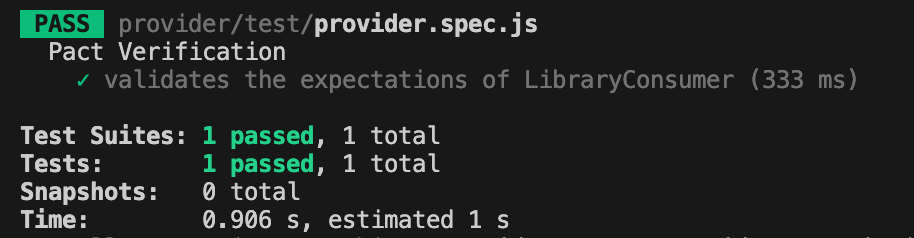
npm run test:providerIf everything set up correctly you should get one test passing:
Conclusion
Today, we explored a practical implementation of the consumer-driven contract testing approach. We created test cases for both the consumer and provider and stored the contract in the same repository.
But you might be wondering—what if the consumer’s and provider’s repositories are separate, unlike our case? Since these two microservices are independent, the contract needs to be accessible to both. So, where should it be stored?
Let’s to explore possible solution in the next part.
Bye for now! Hope you enjoyed it!
 TechNotes
Leave a comment